

Building an AI-powered startup product does not always require developing a language model from scratch. Startups can integrate features such as text generation, document analysis, intelligent search, customer service and automation using OpenAI’s APIs.
However, connecting an API is only one part of the work. However a deployment will require a backend and secure API keys, application logic, error handling, monitoring of usage and evaluation of AI outputs.
For startups with a limited development budget and small engineering teams it is important to make the right decisions to avoid unnecessary complexity.
This guide outlines how integrating the OpenAI APIs will work for your startup, what is included within integration services, key architectural decisions to make, factors affecting the cost of the implementation and how to select a development partner.
Table of Contents
What Are OpenAI API Integration Services for Startups?

OpenAI API integration services involve connecting OpenAI’s models and capabilities to an existing application or a new software product.
Startups can use supported models via API calls rather than building their own base model.
A support platform could be built using an OpenAI model to summarise customer conversations, provide suggestions and classify new support requests.
This would leave the existing application to handle customer account management, permissions, records and business logic.The API adds an AI capability to that existing software.
Depending on the product requirements, OpenAI API integration may involve:
- Connecting OpenAI models to a web or mobile application.
- Developing AI-powered features for SaaS products.
- Integrating AI into existing business workflows.
- Building document processing and information extraction features.
- Integrate models with external APIs and application functions.
- Knowledge base for retrieving information from company documents.
- Create AI assistants and chatbots.
- Monitor, track and evaluate outputs.
This will depend on the functionality of your application. A simple text generation feature might only need a small integration layer. Whereas an AI assistant that can retrieve sensitive customer data and perform actions across multiple systems will need more infrastructure, authorisation and testing.
Why Do Startups Need OpenAI API Integration?

Many startups require smart features but lack the budget to invest in AI infrastructure.
By integrating with the OpenAI API you can add smart features without losing control of your core application.
Here are some reasons why startups use this approach:
1. AI Features without Foundation Models
You will need a significant amount of data, infrastructure setup, engineering knowledge and continued maintenance to develop a foundation model.
This is not required for many early stage products.
Using an existing model through an API allows developers to concentrate on the product experience, application logic, and specific customer problem.
For example, an AI writing SaaS startup could initially integrate an existing model to generate product descriptions. They can focus on building editing tools, user accounts, saved projects and subscriptions.
2. Improve Existing Product Functionality
Startups do not always need to develop an entirely new AI application.
They may already have a working product that could benefit from one additional capability.
A CRM application, for instance, could introduce automatic customer conversation summaries. A project management platform could generate project updates from approved task information.
This approach lets founders test an additional feature without replacing their existing application architecture.
3. Automate repetitive data interpretation tasks.
If your application can provide the correct context, and verify that the generated content is accurate, you can make use of OpenAPI API integration to perform tasks such as:
- Information extraction from business documents.
- Categorizing customer support messages.
- Summarizing meeting notes.
- Preparing draft email responses.
- Organizing product feedback.
- Generating structured information from text.
The model should be for assisting with processing information.
4. Build Product-Specific AI Experiences
A general-purpose AI interface does not automatically understand a startup’s product, customer records, or internal workflows.
API integration makes it possible to build a feature around the information and actions that the application is authorized to provide.
A SaaS platform may build their own assistant that can answer queries based on approved product documentation, or pull specific information related to the account via authenticating backend services.
The usefulness of that feature depends on the quality of the connected information, application permissions, and response evaluation.
What Services Are Included in OpenAI API Integration?
OpenAI API integration services can cover several engineering activities. Not every startup requires all of them.
The right scope will depend on whether you are adding a new AI feature, enhancing an existing product or building your AI powered MVP.
1. OpenAI API Setup and Backend Integration
The first requirement is establishing a secure connection between the application and OpenAI.
Developers will set up your API credentials, choose what API features you need and write backend logic to make requests and handle responses.
This may involve:
- OpenAI account and project configuration.
- API authentication.
- Server-side API integration.
- SDK installation and configuration.
- Request and response handling.
- Environment-specific configuration.
- Error handling and logging.
Ensure your API key is kept on trusted backend systems and not placed within the browser code or mobile application.
Think about what you want to do with the AI functionality within your application.
2. AI Feature Development
An API connection does not automatically create a complete product feature.
Generate text – create product descriptions, marketing copy, summaries or any other text
Classify text – such as support tickets, feedback or incoming requests.
Extract information from text – such as pulling out certain fields of text from a document or unstructured text.
Chatbot – allow users to chat with the product information.
Multi-modal – create features that utilise the supported image/text input.
Choose an API/model that actually meets your requirements.
3. Function Calling and External API Integration
Some startup applications need AI features that can interact with existing software.
An AI assistant may need to get information about a customer’s order status, create a support ticket or add a task to your project management tool.
OpenAI enables models to make requests to run functions defined within an application.
The process generally works as follows:
- The application sends a user request and available tool definitions to the model.
- The model identifies a relevant function and provides its arguments.
- The application receives the function request.
- The backend validates the user, permissions, and arguments.
- The backend executes the authorized function.
- The application returns the result for further processing.
The model does not directly execute the application’s business logic. The backend remains responsible for validating and carrying out actions.
This distinction is important when an AI feature interacts with customer records, subscriptions, payments, or other sensitive operations.
Official reference: https://developers.openai.com/api/docs/guides/function-calling
4. Retrieval-Augmented Generation Integration
Some startups need their AI features to answer questions using company-specific information.
Retrieval-augmented generation (RAG) provides an approach for retrieving relevant information from an external knowledge source and supplying it to a model as context.
A startup could use RAG to build:
- Product documentation assistants.
- Internal knowledge search.
- Customer support assistants.
- Business document search.
- Research and information retrieval features.
The general implementation will involve gathering documents, extracting information, generating queryable information, retrieving relevant parts and passing them to the model.
OpenAI have developed a searchable file tool that can be used in their Response API. This can extract information from uploaded files using setup vector stores.
However, this should not always be implemented for startup use cases. If a feature only requires a short prompt or basic API response then it can create unnecessary complexity to your project by adding a retrieval method.
Official reference: https://developers.openai.com/api/docs/guides/tools-file-search
5. Testing, Monitoring, and Maintenance
AI integration requires more than conventional software testing.
Even if the request was successful, it doesn’t mean the answer is right.
We should test that the model is obeying the instructions, generating the right type of output, can cope with incomplete information and that it works properly with application data.
Post-launch responsibilities may include:
- Monitoring API failures.
- Tracking response times.
- Measuring token consumption.
- Reviewing output quality.
- Testing prompt changes.
- Managing API credentials.
- Updating integrations when requirements change.
These activities help maintain the integration as the startup’s application and user base develop.
What Architecture Is Required for OpenAI API Integration?
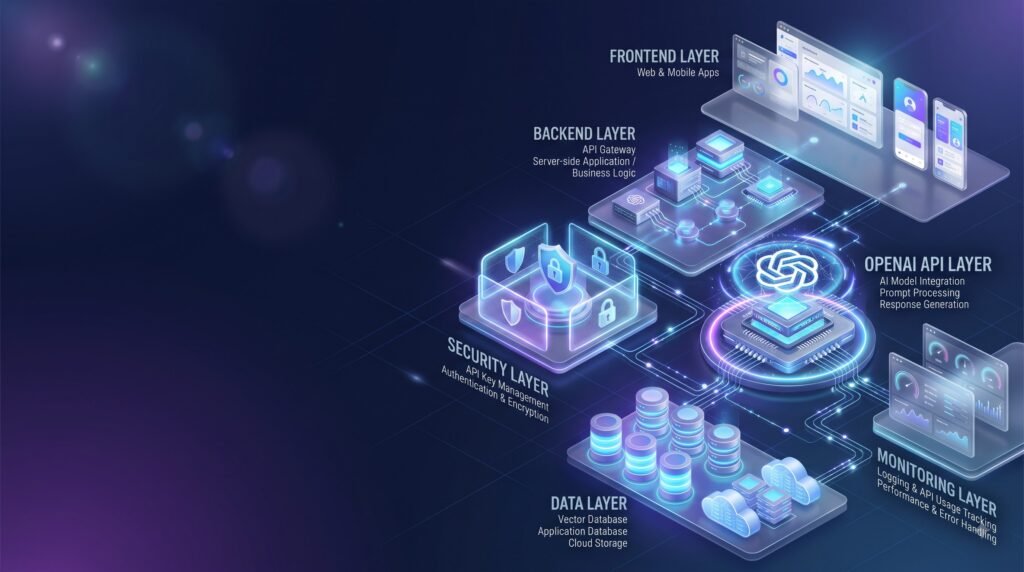
This will depend on the features you’d like to build, existing application, and what data your model needs to use.
For many startup applications, the integration can begin with a relatively straightforward backend architecture.
Basic OpenAI API Integration Architecture
A simplified request flow looks like this:
Frontend → Application Backend → OpenAI API → Backend Response Processing → Frontend
Each component has a specific responsibility.
| Component | Responsibility |
| Frontend | Collects user input and displays results |
| Application backend | Handles requests and business logic |
| Authentication | Identifies users and verifies permissions |
| OpenAI API | Processes supported inputs and generates outputs |
| Database | Stores application records and relevant information |
| Monitoring | Tracks requests, errors, usage, and performance |
Frontend should talk to your backend instead of directly exposing the OpenAI API key.
Backend can dictate what information is sent to the model and how to use the models responses.
When Does a Startup Need a More Advanced Architecture?
A basic integration may be sufficient for a simple content-generation feature.
Other aspects are important if your application needs to deal with large documents, access private data, perform long running operations and/or call a number of external services.
For example:
RAG architecture: Appropriate when the model needs to answer questions using a private or frequently updated knowledge base.
Function-calling architecture: Appropriate when the application needs to expose selected operations or external services to the model.
Queue-based processing: Useful if you have a long-running workload like processing multiple documents.
Streamed responses: Useful if you want to show what is being generated in the UI as it happens.
Usage monitoring: Important if your AI requests are variable in cost or if different customers have different usage limits.
The OpenAI’s Responses API allows text/image inputs, tool calling and stateful interactions. Its Realtime API provides a separate interface for supported low-latency audio and voice applications.
The architecture should be chosen based on your feature requirements.
How to Integrate OpenAI API Into Your Startup Application
A structured approach will help you avoid implementing unnecessary flashy features.
Step 1: Identify the Business Problem
Start by identifying the problem the AI feature should solve.
Don’t jump into choosing a model or listing out AI features.
A startup may find that their customers are spending too long reading through new support tickets.
The first AI feature may be to classify the support messages and generate some response drafts.
What should your feature do? How will you know if it is working?
Step 2: Review the Existing Application
Before implementation, review the application’s architecture and identify the systems that the integration needs to access.
Check:
- Frontend and backend frameworks.
- Existing authentication mechanisms.
- Database structure.
- Available internal APIs.
- User roles and permissions.
- Third-party integrations.
- Existing deployment infrastructure.
This will help to determine if your integration can be fulfilled with your current application or if further development is needed.
Step 3: Select the Appropriate OpenAI API Capabilities
Different features require different API capabilities.
Certain parts of the product have different requirements such as the text generation feature versus an image based or real time voice based application. The Responses API has multiple input and tool capabilities whereas the Realtime API is designed for low latency audio interactions.
Review the official API documentation and test suitable models with representative application inputs.
Do not select a model based only on a general demonstration. Evaluate the quality, latency, and operating cost for the intended task.
Step 4: Configure API Authentication
Create the necessary API credentials and configure the application to access them securely.
A production application should avoid relying on a developer’s personal key as its permanent service identity.
Use appropriate project credentials, environment variables or secret-management infrastructure, and access restrictions.
OpenAI’s recommendations include rotating your keys regularly and expiring them.
Step 5: Develop the Integration Layer
The backend integration layer manages communication between the application and OpenAI.
Validates requests coming into the system by building the correct model inputs. Makes calls to the API with error handling and processing.
Also holds any application specific logic.
This could include only allowing a user to ask about data they have access to. We do not want the AI model to decide what they can do.
Step 6: Connecting to Information & Services
If you need any company documents, customer data or external services identify how you will get that information.
The AI model should not determine permissions independently.
Step 6: Connect Required Data and Services
If the feature requires company documents, customer records, or external business systems, identify how that information will be accessed.
Static knowledge sources may be suitable for a retrieval system.
Current customer information generally needs authenticated application services that retrieve the correct records.
Expose the external functionality using limited and verified functions.
Step 7: Test your integration using realistic test data.
This should include typical requests, partial data, odd requests, API errors, permission errors and unexpected responses.
Ensure that you are actually doing what you want the feature to do.
If it is an AI powered feature keep a good set of test data to evaluate against. Evaluate regularly when prompts, models or application logic changes.
Step 8: Deploy your feature.
Monitor your feature to ensure you are getting the right amount of requests, correct response times, correct API errors, token usage and correct outputs.
Ensure you have the correct budget controls in place and user limits if needed.
Use feedback from users and failed interactions to improve the feature.
Once you have had a successful initial release you should use this as a base to make measured improvements to your product. You shouldn’t try and add every AI feature you can think of.
How Much Do OpenAI API Integration Services Cost for Startups?

There is no universal price for OpenAI API integration services.
The investment will depend on the amount of engineering involved in integrating the API, developing the feature, integrating data from the application, securing and getting it ready for production.
It is important to consider upfront costs vs ongoing costs of using the API.
1. Development and Integration Costs
The development budget may include:
- Product and technical discovery.
- Backend development.
- API configuration.
- Frontend integration.
- Database and third-party connections.
- Authentication and permission controls.
- RAG implementation, if required.
- Testing and deployment.
- Monitoring and maintenance setup.
A simple integration into an existing application will generally involve a different scope from a new AI-powered SaaS product.
2. OpenAI API Usage Costs
OpenAI API usage is billed separately according to the applicable model and service pricing.
Depending on what functionality you are using, there may be some cost considerations:
For text based applications, longer prompts and outputs will lead to increased token usage.
It is best to get an estimate of usage for your requirements.
3. Infrastructure and Maintenance Costs
Cloud hosting, database costs, vector storage, document processing, monitoring, and ongoing engineering support could also be an additional cost.
Not including any costs from the OpenAI API
How can startups calculate the budget for their API?
Use the following basic planning formula:
Estimated monthly API expense = Number of monthly requests × Average cost per request
For a more useful estimate, calculate:
- Expected active users.
- Average AI requests per user.
- Average input tokens per request.
- Average output tokens per request.
- Selected model and current pricing.
- Additional service and storage requirements.
For example, a startup with 1,000 monthly active users might estimate 20 AI requests per user each month.
That produces 20,000 monthly requests.
The actual API expense will depend on the token usage and selected model for those requests. This is why it’s best to get an estimation of how you’ll use the API by testing realistic usage scenarios.
Also make sure to check OpenAI’s official pricing page to ensure you’re aware of any changes to the rates.
How to Keep Costs Down
There are a few things you can do to keep your costs under control:
- Use the right model for the job
- Don’t send extra conversation history.
- Limit generated response lengths.
- Reuse suitable cached information.
- Apply user-level usage limits.
- Track consumption by application feature or customer.
- Set project-level spend alerts and appropriate limits.
- Review expensive or repetitive requests.
For a startup with a short runway it is important to have monitoring in place from the start of your integration.
Security Considerations When Integrating with OpenAI API
Security is an important part of integrating an external AI service into a startup application.
You may be dealing with customer data, uploaded files, business data, and more which should not be exposed.
1. Secure your API Keys
Do not ever expose your secret API keys in frontend JavaScript, mobile code or in public repositories.
Securely store your credentials on the backend.
2. Control the Information Sent to the API
Determine which data is actually required for each AI request.
Do not provide any highly sensitive information.
Ensure the data is minimised, masked and has appropriate retention policies applied.
3. Understand OpenAI’s Data Policies
OpenAI states that API data is not used to train its models by default unless customers explicitly opt in.
However, it doesn’t mean that you can just assume that any API call will be zero retention. The official documentation details how data will be retained based on monitoring abuse, application state, endpoint specific, and criteria you need to meet to get additional controls. Before handling any sensitive data check what policies are in place for the exact API functionality you’re using.
4. Implement Application-Level Permissions
The model should not independently decide which customer records a user can access.
Verify that the user is who they say they are, has the correct account, role and permissions before getting information or completing an action.
For multi-tenant SaaS products, tenant-level isolation should be enforced in the application and data layers.
5. Verify model output
AI generated responses may be inaccurate or incomplete. Before you use model output in any critical business processes perform validation.
Where appropriate apply human verification on any sensitive process such as financial transactions, account modifications or key decision making with customers.
6. Be Prepared For API Errors and Rate Limits
Your application should be able to handle auth failures, invalid requests, timeouts, transient issues and rate limit errors.
Use throttling with exponential backoffs.
Don’t make infinite attempts to retry actions. Don’t automatically repeat actions that may have already been performed.
See the OpenAI Rate Limit Docs for more information.
For further guidance, consult the official OpenAI rate limits documentation.
How to Choose OpenAI API Integration Services for Your Startup

Choosing an integration partner involves more than checking whether a development company has experience sending API requests.
How well do you understand how the AI features will work within your applications’ current architecture? How will these AI features behave when deployed?
Consider the following factors when choosing a provider.
1. Experience With Application Development
The integration partner should understand backend development, databases, authentication, APIs, and deployment.
OpenAI integration is a software engineering responsibility as well as an AI implementation task.
Ask how the proposed architecture will connect to your existing application.
2. Understanding of Startup MVP Requirements
Startups should avoid paying for a complex AI infrastructure before validating the main product feature.
Look for a team that can identify the smallest useful implementation and explain which capabilities can be added later.
Does the scope clearly define what is core to the product and what will just be nice-to-haves?
3. API & Integration Understanding
How will the development team handle API requests, responses from the models, third party functions, error handling and usage tracking?
The team should be able to explain its implementation decisions in terms that both technical and non-technical founders can understand.
4. Security and Data Management
Ask how API credentials will be protected and how the application will enforce access permissions.
If the product will process any sensitive customer data please specify what data is passed to third parties and how data retention will be satisfied.
5. Testing and Evaluation
Ask how the team will measure response quality.
A working demonstration is not sufficient evidence that an AI feature is ready for paying customers.
Describe the test cases, error handling, validation and ongoing monitoring after launch.
6. Documentation and Ongoing Support
Confirm who will maintain the integration after deployment.
Your contract should cover how you have access to the code, API setup, technical documentation, testing and any maintenance.
A startup should be able to understand and manage its product without becoming unnecessarily dependent on one developer.
Common mistakes to avoid
Even if the API integration works from a technical perspective, poor scoping of the feature or lack of readiness of the application can cause issues.
Here are some mistakes you should try to avoid.
Building AI features without validating user demand: An AI feature does not automatically improve a product. Specifically target a problem your customers face.
If you are exposing API keys in frontend code, this presents unnecessary risk. Store your API keys somewhere secure in the backend.
If you’re allowing your models to have free reign to consume any amount of business data, ensure that they are only consuming data they’re authorised to. This should be done via your application services.
If you are ignoring API usage costs, then you could end up with unexpected costs when your feature is actually used by real users.Estimate and monitor consumption.
Ignoring results: You may get a successful API response but it doesn’t mean you will get an accurate / useful answer. Try with some realistic inputs.
Too much infrastructure: You might not need all these extra features like RAG, agents, multiple models and complex automation. Only include what you actually need.
One off integration: Model configuration, application requirements, and how users are using it can change. Plan for maintenance and monitoring.
How BkAbhi Fits Into AI Product Engineering

Startups planning an OpenAI-powered feature need to consider more than the API connection itself. It also depends on the overall product architecture, application logic, UX, and current / future engineering requirements.
BkAbhi is an innovation lab focused on shipping MVPs. Its website provides information about its product development positioning and MVP-focused offering.
For founders planning a new AI-enabled product, the broader AI SaaS development guide explains the engineering and development-partner considerations involved in building AI-powered SaaS applications.
You should speak to BkAbhi directly to confirm what their offering is, specifically around the scope of the service integration they will provide and how much it will cost.
Frequently Asked Questions
1. What are OpenAI API integration services?
OpenAI API integration services involve connecting OpenAI models and capabilities to software applications. Backend development, Authentication, Implementation of AI features, Integration with external APIs, Testing, Monitoring and Maintenance
2. Can startups integrate OpenAI API into an existing application?
Yes. Startups can add OpenAI-powered features to existing web applications, mobile applications, and SaaS platforms. Depending on how your application is built, what APIs are available, how your data is structured and what security measures are required.
3. Should a startup train their own models?
Not necessarily. Many startup applications will make use of pre-trained models via APIs. Only consider training or fine-tuning your own models if you have tested and found out that simpler options won’t work for your product.
4. Which programming languages can be used for OpenAI API integration?
The appropriate language depends on the application’s existing technology stack and the available OpenAI SDKs or API interfaces. Common languages for this are JavaScript and Python. Check out the latest official SDK docs for how to implement.
5. How long does OpenAI API integration take?
There is no set time frame. If you’re focusing on one specific feature that plugs into an existing backend then this can be quicker to implement than building a product with RAG, external services, complex permissions and monitoring. Once you know your requirements and have looked at the current architecture.
6. How much does OpenAI API integration cost?
You will also be charged for development costs and API usage. Additional charges may also apply if you need to host, store and retrieve data plus testing and maintenance. Final costs will depend on what features you want, how much you use and your security requirements.
7. Is OpenAI API suitable for SaaS applications?
It can be suitable for SaaS applications that need text generation, document processing, conversational features, or controlled workflow automation. Authentication, tenancy, rate limiting and access control will need to be implemented.
8. Is OpenAI API data used to train models?
As per OpenAI’s API data policies, by default we do not use data from your inputs/outputs to train our models. This can be opted into by the customer. Data retention and application-state behavior are separate considerations and should be checked in the official documentation.
9. Can OpenAI API perform actions inside an application?
Yes. This feature allows your models to make calls to functions available in your application. You’ll need to validate and authorise the function call at the application level.
10. Should a startup hire an OpenAI API integration company or build internally?
Depending on your start-up’s engineering capabilities, product complexity and delivery requirements, you may want to build an internal team if you have the right API and backend knowledge. An external development partner may help when the startup needs additional engineering capacity or end-to-end product development.
Conclusion
OpenAI API integration gives startups an opportunity to introduce AI capabilities without building a foundation model themselves. However, there are several factors to consider when integrating your API successfully.
Application design, API functionality, Authentication, Data access, Cost of using the API, Testing and Maintenance.
The most practical starting point is to identify one customer problem, build the smallest useful AI feature, and evaluate its performance with real application inputs.
Once you have proven the value of a new feature you can build upon this, based on user feedback and genuine product needs.
Author Bio
Jeevesh Tripathi
Email: jeevesh@bkabhi.com
Jeevesh Tripathi writes research-based content covering technology, artificial intelligence, software development, SaaS, and digital tools. His work focuses on practical explanations, technical comparisons, and evidence-based insights that help founders and product teams make informed technology decisions.