
Table of Contents
What Is a Mobile App Tech Stack?
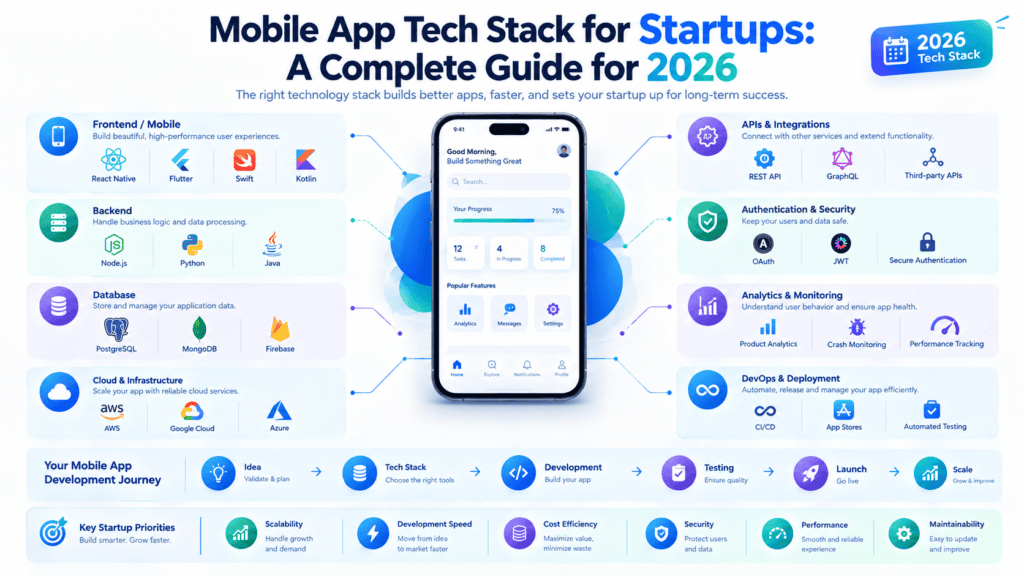
A mobile app tech stack refers to a combination of technologies, programming languages and tools that are utilized for developing and designing a mobile application. The choice of the app tech stack is critical because it determines the app’s performance, scalability, security, development speed and maintenance.
- Frontend technologies: These are the technologies that power the app’s user interface and controls. Some of the technologies that can be used are; iOS (Swift), Android (Kotlin), and cross-platform frameworks like React Native and Flutter.
- Backend technologies: This is where the business logic, APIs, authentication, databases, and other processes are handled. Some of the technologies that can be used are; Node.js, Python, Java, or any other preferred programming language.
- Mobile platforms and software development kits: iOS and Android provide software development kits, tools, libraries, and API needed to design and develop applications for the two platforms.
- Hosting and cloud platforms: Hosting providers like AWS, Google Cloud, and Microsoft Azure offer databases, authentication, server management, storage, monitoring, and other related services.
A good tech stack should be chosen depending on the features, platforms, budget, and the number of users that the app is expected to handle among other considerations.
Key Components of a Mobile App Tech Stack
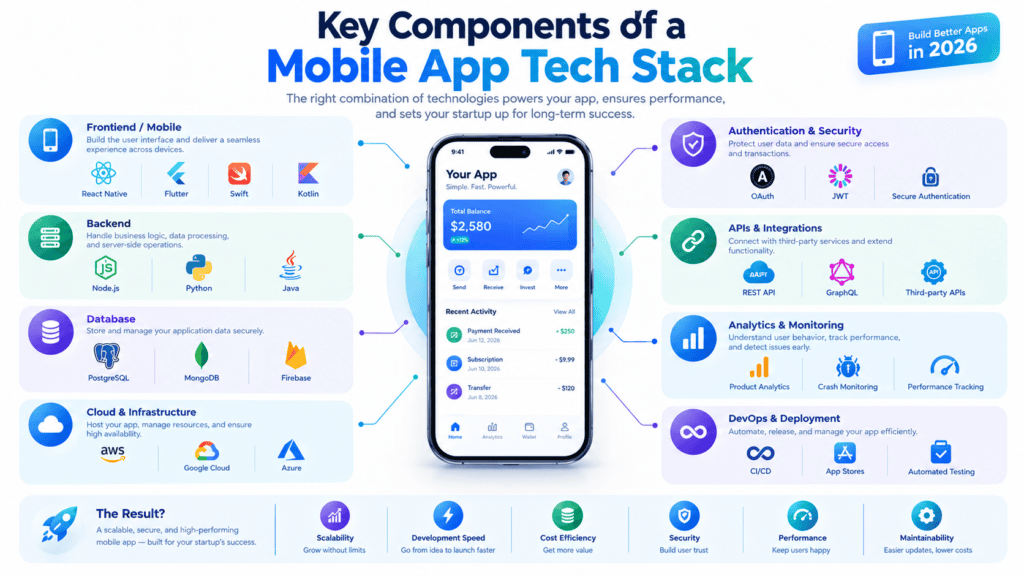
While building a mobile application is not as simple as selecting one programming language, it generally involves choosing a set of solutions for creating a mobile app that work together to accomplish specific tasks. Below are five basic components of a successful mobile app tech stack.
1. Frontend Development
The frontend is everything users see and interact with — the buttons, screens, animations, and overall user experience. This layer determines how smooth and intuitive your app feels.
Common choices:
- Native development: Swift/SwiftUI for iOS, Kotlin/Java for Android — gives the best performance and UX for a particular platform
- Cross-platform: React Native, Flutter, Xamarin — build apps for different platforms using single codebase
The choice of solutions depends on the budget, project timeline, and desired UX level.
2. Backend and Database
The backend is the engine room of your app — it runs business logic, handles user authentication, processes data, and enables server-side operations that power the app from behind.
The most common backend solutions are:
- Backend programming languagues/frameworks: Node.js, Python (Django, Flask), Ruby on Rails, Java (Spring Boot)
- Databases: SQL (PostgreSQL, MySQL) and NoSQL (MongoDB, Firebase Firestore)
A well-architected backend ensures your app’s business logic is secure, scalable and performant. It should be designed with your specific needs in mind — for instance, a social media app will require different database optimization techniques than an e-commerce app.res your app can handle growing users and data without breaking down.
3. APIs and Integrations
Application Programming Interfaces (APIs) are the bridge connecting your app’s frontend to the backend, and also letting your app communicate with third party services.
Common integrations include:
- Payment gateways (Stripe, PayPal, Razorpay)
- Maps and location services (Google Maps API)
- Social login and sharing (Facebook, Google Sign-In)
- Push notifications (Firebase Cloud Messaging, OneSignal)
- Analytics tools (Google Analytics, Mixpanel)
Well-designed APIs (often RESTful or GraphQL) use standardized request/response formats, authentication mechanisms like OAuth tokens, and are typically hosted on scalable cloud platforms.QL) make your app modular, scalable, and easier to maintain.
4. Platform Layer
These are the operating systems and devices your app needs to target — primarily iOS and Android — as well as their corresponding SDKs, tools, and guidelines.
Considerations:
- Platform-specific design guidelines (Apple’s Human Interface Guidelines, Google’s Material Design)
- Device compatibility (screen sizes, hardware capabilities)
- OS version support and update cycles
Deciding whether to target both platforms (or just one)native, cross-platform, or hybrid largely depends on your platform strategy.
5. Hosting and Deployment
Once your application is created, it requires some hosting and processes for its launch.
The most common possibilities are:
- Hosting providers (AWS, Google Cloud, Microsoft Azure), where the application will be hosted (servers)
- Distribution platforms (Apple App Store, Google Play Store) for distributing the application to users
- CI / CD tools (Jenkins, GitHub Actions, Bitrise) for the application’s continuous integration and delivery
In this way, choosing reliable hosting allows you to provide an application that will be available to users for a long time. Hosting also provides the required domain name and protects data from being hacked.ptime and performance, while smooth deployment pipelines let you ship updates quickly and safely.
In summary, a mobile application technology stack should not be considered as software technologies but as the system comprising frontend and backend technologies, application programming interfaces (APIs), platforms, and tools for hosting that are needed to operate the application.
Native vs Cross-Platform vs PWA Development
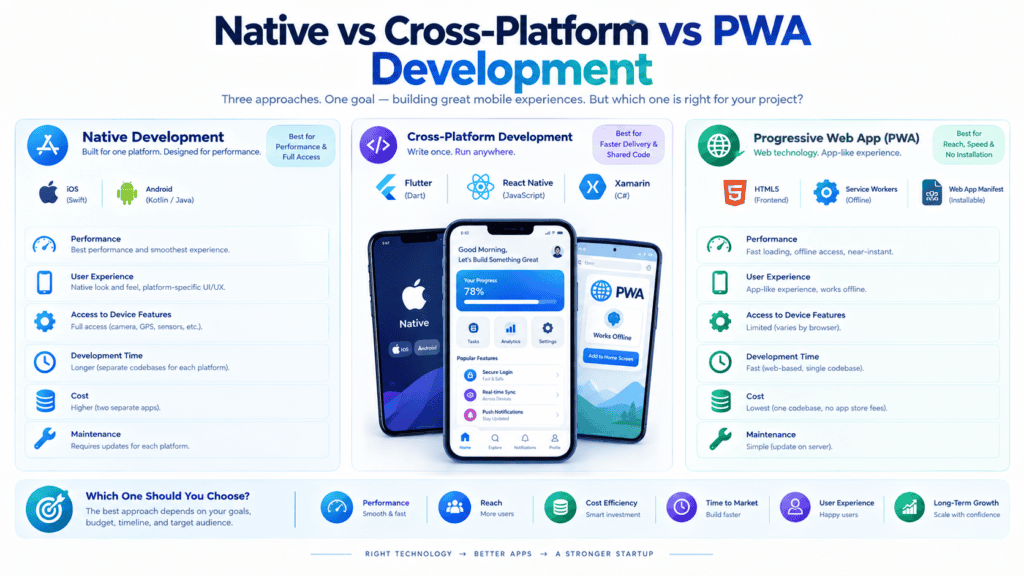
The selection of the mobile application architecture is one of the most essential decisions made by product managers, CTOs, and founders. The mobile app development market is no longer dominated by just two options — iOS and Android — but rather includes Native, Cross-Platform, Progressive Web Apps, and AI / No-Code platforms.
1. Native Mobile Apps (iOS & Android)
Native app development consists of developing individual applications for different operating systems using the language preferred by the vendor, for example, Swift / SwiftUI for iOS or Kotlin / Jetpack Compose for Android.
┌─────────────────────────────────────────┐
│              Native App                 │
├────────────────────┬────────────────────┤
│   iOS Codebase     │  Android Codebase  │
│  (Swift / SwiftUI) │ (Kotlin / Compose) │
└──────────┬─────────┴─────────┬──────────┘
           │                   │
           ▼                   ▼
    Direct Access       Direct Access
           │                   │
           └─────────┬─────────┘
                     ▼
           [ Device Hardware ]
   (Camera, Bluetooth, ARKit, Sensors)
Strengths
- Uncompromising Performance:Native code talks directly with the operating system and has no bridges or rendering engines in between, providing silky-smooth frame rates.
- Zero-Day Platform Access:New hardware features (such as Apple Vision Pro APIs, new Bluetooth standards, or live activities) are immediately available when they’re released by Apple or Google.
- Deep Hardware & Background Integration:Get best-in-class support for background processing, sensors, Bluetooth devices, ARKit/ARCore, and companion targets like watchOS, Wear OS, or CarPlay.
Trade-offs
- Highest Cost & Time to Market: You need to write, test, and maintain two codebases.
- Double the Team Footprint:You also need two different engineering teams since Android and iOS have fundamentally different development processes.
Best For: High-end 3D games, heavy AR/VR applications, IoT hardware control apps and tier-one consumer apps where every millisecond of UI latency matters.
2. Cross-Platform Frameworks
Cross-platform development uses a single codebase to target both iOS and Android simultaneously.Today’s dominant frameworks include Flutter (Google), React Native (Meta), and Kotlin Multiplatform (KMP).
┌─────────────────────────────────────────┐
│        Single Business Logic            │
│    (Dart / JavaScript / TypeScript)     │
└────────────────────┬────────────────────┘
                     │
        [ Framework Engine / Bridge ]
     (Flutter Impeller / RN New Architecture)
                     │
           ┌─────────┴─────────┐
           ▼                   ▼
    iOS Rendering       Android Rendering
Key Framework Breakdown
| Framework | Core Stack | Strengths | Ideal Scenario |
| Flutter | Dart | Pixel-identical rendering across screens; custom 2D Impeller engine. | Custom-branded consumer apps & complex UI design systems. |
| React Native | JS / TypeScript | Shares code directly with web apps (React); native platform UI feel. | Teams with existing React web developers & AI/LLM SDK workflows. |
| Kotlin Multiplatform (KMP) | Kotlin | Shares core business logic while keeping native UIs (SwiftUI & Jetpack Compose). | Existing apps migrating from native without sacrificing platform UX. |
Strengths
- 60-80% Code Sharing:This can dramatically reduce time to market budgets and accelerate development time.
- Unified Engineering Team:Builds, tests, and deploys features to both Apple App Store and Google Play Store
Trade-offs
- Potential Weakness
- Dependency on Community Adapters: Accessing the specialized device or niche APIs may require custom native bridge implementation
- Slight App Size Overhead:Contains framework rendering engines or JavaScript runtimes in the binary package.
Best For: Startups, enterprise tools, e-commerce, fintech, social apps, and logistics platforms needing fast multi-platform presence.
3. Progressive Web Apps (PWAs)
A Progressive Web App is essentially a website enhanced with modern browser capabilities—such as Service Workers, WebAssembly, and Web App Manifests—allowing it to function like a native mobile app.
┌─────────────────────────────────────────┐
│           Progressive Web App           │
│         (HTML / CSS / JS / Wasm)        │
└────────────────────┬────────────────────┘
                     │
            [ Browser Runtime ]
           (Webkit / Chromium)
                     │
          [ Device / OS Sandbox ]
Strengths
- Bypass App Store Friction: Users install the app directly from their browsers onto their home screens without taking up much space or having to wait for it to be approved and listed on an app store.
- Lowest Cost Profile:Saves costs since a single codebase is used for both mobile and web users.
- Instant Over-the-air Updates:Updates can be rolled out instantly and deployed right away.
Trade-offs
- Apple WebKit Restrictions: Despite Android’s support for all PWA capabilities, iOS restricts the use of background sync, push notifications, and sensors.
- Discoverability Limitations: No straightforward discovery on the official Apple App Store or Google Play Store (store wrappers can be used).
Best For: Content portals, SaaS tools, restaurant ordering menus, utility tools, and products where friction-free onboarding via search engines is critical.
4. No-Code & AI-Powered App Builders
Platforms like FlutterFlow, Bubble, Glide, and conversational AI toolsets enable non-technical builders or small engineering teams to visually assemble full-stack web and mobile apps.
┌─────────────────────────────────────────┐
│     Visual Drag-and-Drop & AI Prompts   │
└────────────────────┬────────────────────┘
                     │
          [ Builder Engine / Compiler ]
                     │
      ┌──────────────┼──────────────┐
      ▼              ▼              ▼
 Native Code     Web Build    Hosted Cloud
(e.g., Flutter)   (PWA)       Backend APIs
Strengths
- Quick Project Launch: MVPs (Minimum Viable Products) built from prototype can be deployed for real-world use in days or weeks, not months.
- Significant Budget Saving: Lets both solo founders and non-technical teams to experiment without spending money on engineers right away.
- Production Code Export: FlutterFlow and others let you export clean, human-readable Flutter code, so you’re not trapped in a proprietary environment.
Trade-offs
- Custom logic constraints: To go beyond basic relational DB operations (CRUD), social media-style feeds, or generic workflow automation, you need to write significant amounts of custom code.
- Scale and hosting costs: At scale, API-driven apps can become expensive, particularly if you’re on a proprietary backend hosting plan.
Best for: Building prototypes, internal tools, automations, and minimum viable products for startups that need to test an idea in the real world quickly.
Strategic Comparison Matrix
| Feature / Criteria | Native (Swift/Kotlin) | Cross-Platform (Flutter/RN) | Progressive Web App | No-Code / AI Builders |
| Development Cost | Highest | Moderate (30–40% savings) | Low (40–60% savings) | Lowest |
| Time to Market | 4–6+ Months | 2–4 Months | 1–2 Months | Days to Weeks |
| Performance | Maximum | Near-Native | Moderate / Browser Dependent | Moderate |
| Device Hardware Access | 100% Full Access | High (~90–95%) | Limited (OS Sandboxed) | Basic to Moderate |
| App Store Presence | App Store + Google Play | App Store + Google Play | Web / Direct Install | Varies (Some export to stores) |
| Maintenance Effort | High (2 codebases) | Moderate (1 codebase) | Lowest (1 web deployment) | Handled by Platform |
How to Choose the Right Tech Stack
                              [ Which approach fits your product? ]
                                                │
             ┌──────────────────────────────────┼──────────────────────────────────┐
             ▼                                  ▼                                  ▼
   Need extreme graphics,             Want fast launch across             Need zero friction,
    IoT, or AR capabilities?          iOS & Android on a budget?           no store installs?
             │                                  │                                  │
             ▼                                  ▼                                  ▼
      [ Build Native ]                 [ Cross-Platform ]                       [ PWA ]
   (Swift / Kotlin)                   (Flutter / React Native)                 (Web Stack)
- Choose Native if: Your app’s core lies in heavy lifting, 3D graphics, audio/video editing, or bluetooth-heavy features
- Choose Cross Platform if: You need something high quality in both iOS and Android app stores, using common hardware features, with a single dev team
- Choose a PWA if: Your users are finding you via search engines or bookmarks, and you want to avoid app store commissions, approvals, and friction
- Choose No-Code/AI if: You’re prototyping an early-stage idea, want to build something useful for internal operations, or need to release a functional MVP on a budget
How to Choose the Right Mobile App Tech Stack
Choosing the tech stack is one of the first and most important decisions you need to make before building a mobile web application, and it can be overwhelming. The right choice will ensure your product’s success and exponential growth; the wrong one — and you will have to invest a lot of time and effort into rewriting the code.
There is nothing universal about the best tech stack; it should be chosen according to the features and functions required for your project. Below are five tech stack selection criteria that will help you make the right choice.
1. Technical Expertise
The existing skills of your team may be more important than theoretical advantages of any particular framework.
- In-house team: if your developers already know JavaScript, using React Native or Flutter (which uses Dart, but many teams are quick to learn a new language) will allow you to build apps faster, without having to learn new programming languages and spend time training.
- Native specialists: if you have iOS developers who know Swift or Android developers who know Kotlin, developing native applications will allow you to use their skills to the maximum.
- Outsourcing or hiring: if you need to create a team of developers from scratch, think about which programming languages and technologies have the most supply in the market in your budget range.
Choosing an unfavored framework could result in the inability to find specialists with the necessary skills.miliar stack just because it’s trendy often slows a project down rather than speeding it up.
2. Target Audience and Platforms
Who you build for will determine which platforms you build on, and therefore which stack to pick.
- iOS only or Android only: Apple and Google each have their own ecosystems, and building natively on those (using SwiftUI for iOS or Jetpack Compose for Android) will give you the best results in terms of performance and feature sets.
- Both: If you have to build for both, consider using a cross-platform framework (Flutter or React Native) to save development and maintenance resources.
- Geography and devices set: Some regions have more diverse populations in terms of devices and therefore require apps that perform well on both high-end and low-end smartphones.
3. Development Budget
Budget constraints may limit your options right away.
- Cross-platform tools tend to be more cost-effective; the same codebase will run on different platforms, so you essentially get more for your money.
- While a native team may prove to be more expensive (due to having to write separate codes for different platforms), it may be worth it for complex apps that demand higher specs.
- In addition to salaries, long-term maintenance and your ability to hire people with the necessary skill set for the chosen platform may also be a factor to consider.
4. Development Timeline
The choice of the stack depends on the required speed to market.
- Tight deadlines: Tools allowing you to develop apps for multiple platforms, use already existing UI libraries, or have extensive toolkits (e.g., React Native) can allow you to reach the market faster.
- MVP/POC: A low-code or cross-platform solution would be helpful to prove the concept and attract users before investing more resources into development.
- Long-term/complex product: In case of a prolonged development cycle, it is better to invest time and effort into learning and building a solid native app or product. It will allow you to avoid technical debt and save time and money on rewriting the code later.
5. Required Functionality and Integrations
The features your application will use may well dictate the potential tech stacks for your development.
- Apps involving heavy use of hardware such as augmented or virtual reality, advanced computer vision, Bluetooth devices or sensors may see better results using a native approach or one that has strong native module support.
- Applications using third-party tools (payment, CRM, analytics, etc.) should verify if the desired stack has appropriate plugins for these services.
- Apps focusing on performance-critical graphics or physics may benefit from being developed as a native application or using a dedicated engine like Unity.
- Finally, the backend and API requirements of the application should be taken into account when choosing a stack for the mobile application.
Bringing It All Together
In practice, these five factors are interrelated. A start-up that is on a tight budget and has a limited timeline but with an audience split between iOS and Android is highly likely to choose Flutter or React Native. An enterprise with a team of in-house specialists in native development that want to build a performant app will go for native development for both platforms despite the high costs.
The best choice is to make a priority list based on your needs and not on some random examples on the web. It is essential to match individual requirements to the unique characteristics of the technologies. A winning solution for one app might be a disaster for another.
Popular Mobile App Tech Stacks
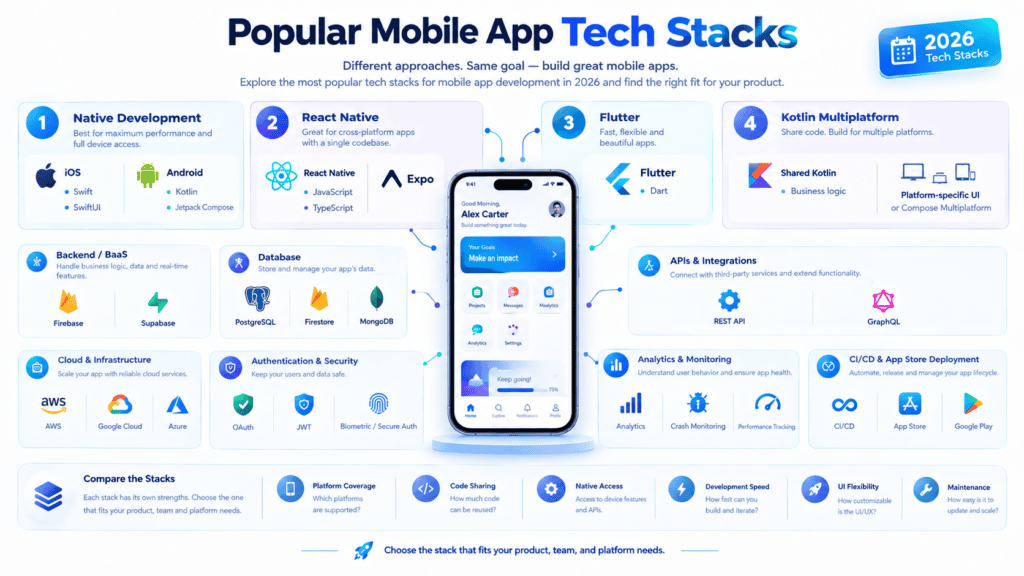
The choice of the tech stack for mobile application development significantly impacts the project’s scalability, speed, and maintenance. The following five mobile app architecture types are divided into sections that describe how they operate, what use cases they are applied to, and what trade-offs they involve. For a deeper understanding of the technologies and tools involved, explore this guide to the mobile app tech stack.
1. Native iOS Architecture
Swift + Firebase + AWS
This stack consists of Apple’s native frontend technologies plus a mix of serverless and cloud backend. It is best fitted for high-performance iOS applications which require direct access to Apple’s hardware and features.
Core Components
- Frontend (Swift + SwiftUI / UIKit): Swift is a type-safe compiled language that is optimized for performance on Apple hardware; when paired with SwiftUI, it allows for building responsive, declarative interfaces that take advantage of native platform behaviors
- Real-time & Auth Layer (Firebase): Manages lightweight serverless features like authentication, real-time database sync (Firestore), push notifications (FCM), and crash reporting (Crashlytics).
- Cloud Infrastructure (AWS): Houses business logic, static assets, background workers, and long-term relational data warehousing for compute-heavy operations.
Strengths & Trade-offs
- Pros: Leading-edge UI/UX capabilities, cutting-edge iOS-specific APIs (CoreML, ARKit, Metal) access at launch, rapid MVP backend prototyping with Firebase plus enterprise-grade AWS scalability.
- Cons: Premium pricing due to iOS ecosystem lock-in and complex Firebase-AWS integration architecture.
- Best For: High-growth iOS-native startups, fintech innovators leveraging Apple security features, graphic-intensive consumer apps targeting iPhone users.
2. Native Android Architecture
Kotlin + PostgreSQL + Google Cloud (GCP)
A robust enterprise stack tailored for the Android ecosystem. It pairs Kotlin and modern Jetpack tools with an enterprise relational database hosted natively on Google’s infrastructure.
Core Components
- Frontend (Kotlin + Jetpack Compose): Kotlin is Google’s preferred language for Android development. Jetpack Compose (a new declarative approach for building UI) accelerates the development of UI components while reducing boilerplate code.
- Database layer (PostgreSQL): An open-source powerful ORDBMS (object-relational database management system) with high reliability and performance. Great for building apps with complex schema, ACID-compliant transactions, and heavy relational querying.
- Cloud and server infrastructure (GCP): Google Cloud Platform hosts the server backend (Node.js, Go, or Java/Spring Boot APIs) on Cloud Run or GKE (Google Kubernetes Engine) and manages the database with Cloud SQL for PostgreSQL.
Strengths & Trade-offs
- Pros: Tight integration with Android’s system-level APIs, efficient handling of complex multi-relational data models, and native network routing through GCP.
- Cons: Requires backend engineering (REST/GraphQL API development) compared to serverless alternatives.
- Best For:Enterprise-grade Android apps, logistics platforms, e-commerce ecosystems, and apps with intensive structured data processing needs.
3. Cross-Platform Web-Native Stack
React Native + Firebase
A popular cross-platform stack for rapid product releases. React Native compiles to native iOS and Android components via JavaScript/TypeScript. Lets teams share up to 90% of code between the two platforms.
Core Components
- Frontend (React Native): React Native framework, maintained by Meta (formerly Facebook), lets developers use React’s tools to create native apps for iOS and Android. It’s React bindings for native UI widgets.
- Backend Platform (Firebase): Firebase is an end-to-end BaaS (Backend-as-a-Service) platform that provides an out-of-box solution for building apps without having to design a backend system. It removes the need to develop and deploy the backend before the frontend can be created.
Strengths & Trade-offs
- Pros: faster time-to-market, one engineering team for both products, and over-the-air code updates.
- Cons: heavy reliance on 3rd-party bridge libraries for complex hardware interactions, potential performance issues at heavy graphic rendering
- Best for: MVPs, social platforms, content-heavy apps, and startups with tight launch schedules.
4. Flutter-Based Mobile Stack
Flutter (Dart) + Node.js / Go + Supabase / PostgreSQL
Flutter differs from React Native by controlling every pixel directly on a custom rendering engine (Impeller). This architecture provides smooth animations and uniform UI appearance across devices.
┌─────────────────────────────────────────────────────────────┐
│                      FLUTTER FRONTEND                       │
│           (Dart UI Engine / Skia & Impeller)                │
└──────────────────────────────┬──────────────────────────────┘
                               │ REST / gRPC / WebSockets
                               ▼
┌─────────────────────────────────────────────────────────────┐
│                       CUSTOM BACKEND                        │
│            (Node.js / Express or Go Fiber API)             │
└──────────────────────────────┬──────────────────────────────┘
                               │ SQL Queries / ORM
                               ▼
┌─────────────────────────────────────────────────────────────┐
│                  DATABASE & BAAS INFRA                      │
│            (Supabase / PostgreSQL + Cloud Storage)          │
└─────────────────────────────────────────────────────────────┘
Core Components
- Frontend (Flutter & Dart): Google’s UI toolkit compiles Dart directly into native ARM machine code, bypassing the need forJavascript bridges for native-level FPS performance.
- Backend Layer (Node.js / Go / Firebase): Commonly used with serverless platforms such as Firebase/Supabase to accelerate time-to-market, or with Node.js/Go backend microservices for enterprise-grade apps that demand low-latency operations.
- Database Layer: Often used with PostgreSQL or Supabase (an open-source Firebase alternative built on Postgres) to enable real-time data streaming.
Strengths & Trade-offs
- Pros: High fidelity UI, great state management solutions, and close to native performance for animations
- Cons: Larger initial app size and fewer legacy third-party plugins than in JavaScript ecosystems
- Best for: Apps with custom UI design, data-heavy dashboards, streaming services, or products that need to target iOS, Android, and desktop at the same time
5. No-Code & AI-Powered Stack
Visual Builders (Bubble / Adalo / FlutterFlow) + vibe-coding AI / BaaS
This modern stack relies on visual visual development builders, declarative logic engines, and integrated AI tools to build and launch mobile apps without writing low-level code.
Core Components
- App Builder Frontend:
- FlutterFlow / Adalo: Drag-and-drop mobile visual app builders that generate native app binaries (IPA/APK) ready for app store deployment.
- Bubble Mobile: A low-code/no-code full-stack builder that connects visual interfaces to custom backend workflows.
- FlutterFlow / Adalo: Visual drag-and-drop mobile app builder tools, which output native app binaries (IPA/APK) suitable for publishing on an application store.
- Bubble Mobile: Low-code/no-code full-stack builder linking visual interfaces to a backend workflow.
- AI & Logic Generation Layer: With tools such as Claude, GPT-4o, Bolt, or Lovable, complex backend logic, schema definition for APIs, and database queries can be generated.
- Managed Backend: Makes use of visual database engines or external low-code BaaS (Backend as a Service) tools such as Supabase and Xano to manage data and receive external webhooks.
Strengths & Trade-offs
- Pros:Development takes less time (from days to weeks instead of months), cheaper, non-technical founders can control the app development iteration
- Cons:Custom feature development may be limited due to the nature of the platform, vendors may lock you in, and it can get expensive when you want to scale up to millions of users
- Best For:Non-technical founders who want to test early product-market fit, internal business tools, automation apps and early MVP development
Summary Stack Comparison
| Tech Stack | Time-to-Market | Performance | Maintenance Effort | Primary Trade-Off |
| Native iOS | Slow | Maximum | High (iOS Only) | High development costs and platform limitation. |
| Native Android | Slow | Maximum | High (Android Only) | Complex backend setup required for relational data. |
| React Native | Fast | High | Moderate | Dependent on third-party bridge native modules. |
| Flutter | Fast | Near-Native | Moderate | Larger initial installation package sizes. |
| No-Code / AI | Extremely Fast | Moderate | Low | Limited customization flexibility at large scale. |
The Ultimate Tech Stack for Modern Mobile App Development (2026 Edition)
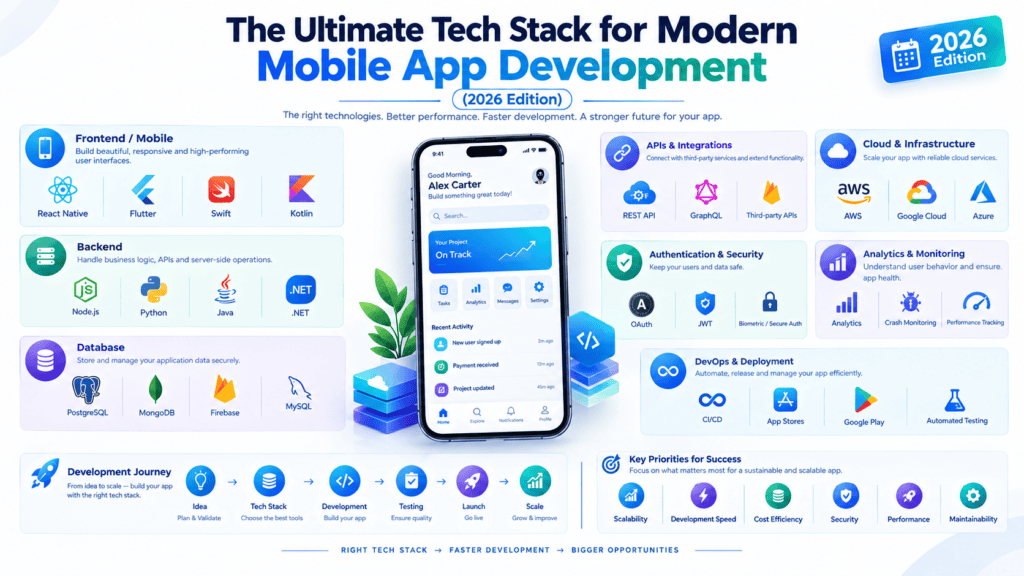
Building a great mobile app in the current environment requires much more than just writing the client code. Your development team and you need to think about how to make the apps launch quickly, process payments securely, handle background operations, and continuously optimize the user experience based on analytical data.
Whether you want to release a single-featured MVP version of the app or scale the product to thousands or even millions of users, you need to consider the best tools for these modern development stacks. Further in this article, we will go through them in detail, describing and analyzing the most used mobile app development tools for iOS and Android from scratch.
1. App Development & Foundation: Bubble
Traditionally, developing native mobile apps required separate teams for iOS (Swift) and Android (Kotlin). Bubble transforms this paradigm by providing a visual, AI-driven, no-code app development platform.
- Native Mobile Support:Bubble allows you to design, test and publish native mobile apps (iOS and Android, built in React Native) from the same visual editor
- Unified Web and Mobile Backend:If you have a web dashboard and want to build a mobile app, you can manage the same data and user system in one place saving development time
- Access to device features:Use native device features such as push notification, camera and geolocation, custom user interface elements like swipes or bottom sheets and much more.
- Why it matters:Bubble reduces time-to-market and capital-intensive development, letting you launch apps on the App Store and Google Play faster.
2. Monetization & Payments: Stripe
Monetizing your mobile app requires a secure, frictionless payment processor that respects global compliance and supports multi-currency transactions. Stripe is the industry standard for mobile payment infrastructure.
- In-App Purchases & Subscriptions Stripe covers billing for one-time purchases of content or digital goods, as well as subscriptions and other ongoing payments.
- Mobile Checkout Stripe has lightweight Mobile SDKs for iOS, Android, React Native, and Flutter that let you build beautiful, custom checkout sheets that accept Apple Pay, Google Pay, cards, and local payment methods.
- Security and Compliance Stripe’s out-of-the-box support for PCI-DSS compliance and powerful fraud detection tools, Stripe Radar, help to protect customer data and reduce risk without adding complexity.
- The importance Stripe plays in mobile commerce: Checkout conversion rates on mobile are typically lower than on web, and customers are often hesitant to enter in their credit card details. Stripe helps to increase conversion by building trust and reducing friction in the checkout process, while also handling complex tax and subscription management behind the scenes.
3. Automation & Ecosystem Connectivity: Zapier
Modern mobile apps are rarely standalone products, they often need to communicate with marketing solutions, CRM databases, support systems, and other internal tools. Zapier acts as an API bridge between your mobile application and thousands of external services.
- No-Code Webhooks & Workflows: Tie your app’s database trigger (e.g., New User Registration) to automatically fire off multi-step workflows (“Zaps”) across 6,000+ third party tools.
- Operational Efficiency: Use Zapier to notify your team of a new lead via a Slack message, or your Hubspot CRM of a new customer profile, or a spreadsheet of your choice whenever a sale has happened in your app
- Rapid Prototyping: Avoid writing out custom, maintenance intensive API integrations during your early development stages by delegating complex data transfer logic to Zapier
- Why it matters: It saves your engineering team hundreds of hours of custom API development work, keeping your mobile codebase’s primary focus on core feature development rather than peripheral infrastructure work.
4. Acquisition & Traffic Analysis: Google Analytics (GA4)
Understanding where your mobile users are coming from and how web marketing efforts affect app installs is essential to a sustainable user acquisition strategy. Google Analytics 4 (GA4) provides the primary solution for top-of-funnel traffic and acquisition analytics.
- Cross-Platform Attribution: Track the end-to-end journey of the user across web landing pages, ad campaigns, and mobile app installations.
- Ad Integration: Deeply integrates with Google ads and other marketing platforms to measure ROI, cost per acquisition (CPA) and campaign attribution.
- Traffic Insights: Analyze traffic demographics, geographical distribution, referral sources, and high-level engagement.
- Why it matters: Google Analytics determines which acquisition channels bring the best users, helping to avoid spending budget on low-value channels and informing the overall marketing strategy.
5. Product Performance & Feature Analytics: PostHog
While traffic tools will tell you how users found your app, product analytics tools tell you what users did within your app. PostHog is an open source, all-in-one product engineering platform that helps you better understand your users and improve your product.
- Feature Flags and A/B Testing: Deploy new mobile features to only a small percentage of users, perform multivariate testing, and have the option to quickly kill a feature if bugs arise
- Session Replays and Heatmaps: See what users are doing during session replays and what they’re struggling or swiping away at in real time.
- Open Source and Privacy Control: PostHog can be self-hosted or on the cloud, giving teams greater control over their user data privacy (and security, for HIPAA/GDPR compliance).
- Why it’s useful: It helps bridge the gap between analyzing business analytics and developing engineering initiatives based on them.
6. QA, Bug Reporting, & User Feedback: Usersnap
Even the best tested mobile app may have a number of edge-case bugs, UI issues and performance(UI) bottlenecks across various Smartphone platforms. Usersnap makes the collection and management of these bugs and user feedback easy and intuitive.
- Visual In-App Feedback: Let beta testers and end-users report issues directly from their mobile devices by capturing screenshots, annotating, or recording screen videos.
- Automated Metadata: Attach device logs, OS versions, resolution, network state, and console logs of the application automatically when a user submits feedback to Usersnap.
- Micro-Surveys: Send contextual in-app NPS, CSAT, or feature request surveys to gather product feedback based on a user’s behavior in your app.
- Why it matters: Eliminate back-and-forth email threads between QA and users by enabling developers to reproduce and fix issues faster.
7. Deep Behavioral Analytics: Mixpanel
To maximize user retention and minimize churn, you need granular insights into long-term user behavior. Mixpanel is designed for deep event-based analytics and retention modeling.
- Event-Based Tracking: Tracking of particular micro actions (Button Tapped, Video Watched 50%, Item Added to Cart).
- Funnel & Cohort Analysis: Creation of conversion funnels to identify points during a multi-step onboarding process where users abandon, and subsequently clustering of users into cohorts based on certain behaviors.
- Retention Metrics: Measuring users’ return rates throughout days or weeks to evaluate a product’s ability to retain its users to identify its product-market fit.
- Why it matters: Mixpanel is able to answer nuanced business questions around products, like “do users who complete onboarding within the first day have higher 30-day retention rates than those who onboarded later?”
Summary: How These Tools Work Together
| Layer | Tool | Key Role in Your Mobile App |
| Development | Bubble | Visual design, logic, and multi-platform native deployment. |
| Monetization | Stripe | In-app purchases, recurring subscriptions, and secure checkout. |
| Automation | Zapier | Connecting mobile app events with external tools and third-party APIs. |
| Acquisition | Google Analytics | Tracking ad performance, web-to-app traffic, and user origins. |
| Product Analytics | PostHog | Session replays, feature flags, and technical product insights. |
| Feedback & QA | Usersnap | In-app visual bug reports, context-rich error logging, and user surveys. |
| Behavioral Data | Mixpanel | Deep funnel tracking, cohort retention analysis, and user journey mapping. |
Final Thoughts
Using a powerful visual app engine like Bubble, together with appropriate tools for payments, automation, and analytics, modern product teams can get enterprise-grade mobile apps built, released, and monetized with significantly less engineering effort than would otherwise be required.
Best Mobile App Tech Stack for Startups
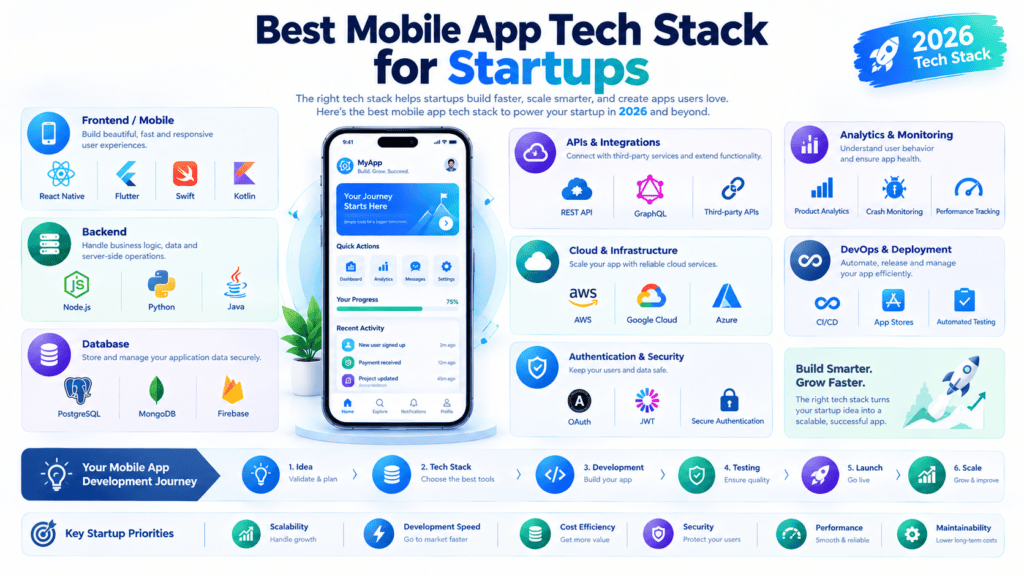
Choosing the tech stack is one of the most important but also one of the least understood decisions a startup has to make. Picking the wrong tech and the company will either waste their runway by chasing product market fit or not scale properly when they find it. Here are some thoughts on the subject.
1. Choosing Technologies for an MVP
The point of an MVP is to maximize our chances of failure by minimizing the amount of wasted effort, thereby changing the conversation around good enough. Good enough doesn’t mean good technology, it means something else entirely.
There’s no reason to use anything besides cross-platform solutions for an MVP. Flutter and React Native both allow roughly double the development time reduction by utilizing a shared codebase that targets both iOS and Android, rather than building two separate native applications.
Unless you have some use-case that requires leveraging cutting edge technology not available in either iOS or Android, building a native application is going to sacrifice your ability to iterate quickly.
- React Native: great choice if your team already knows JS/TS, very large ecosystem and easy to hire for.
- Flutter: excellent performance and UI consistency, rising star, great for design-heavy apps.
- Native (Swift/Kotlin): only worth considering if you want to target one platform first, or need absolute performance (games, AR, heavy media processing).
The use of Backend-as-a-Service tools can save you weeks of development time by providing authentication, databases, storage, and cloud messaging solutions. Firebase, Supabase or AWS Amplify, for example, offer out-of-the-box solutions so that you do not have to design and develop a custom backend to prove a concept or a minimum viable product.
Rule of thumb: at MVP stage, optimize for developer velocity and low commitment, not long-term architecture purity. You will likely rebuild parts of this later — that’s fine, that’s the point.
2. Balancing Cost and Scalability
Startups are likely to go too far in either direction: cheap and disposable or over-engineered for a scale that we don’t have yet
The problem with this approach is that we get stuck in either of the two extremes.
To avoid this trap, let us think again about infrastructure. The trend in the serverless market (AWS Lambda, Google Cloud Functions), managed databases (Supabase, PlanetScale, MongoDB Atlas) means fewer things to host and configure, and we only pay for what we use. We can get away without a DevOps hire for much longer.
Design for scalability (but not premature optimization). That means:
- Keeping business logic decoupled from the framework (so you can swap it out later without rewriting everything)
- Using a database that can scale with you (Postgres, not a toy DB)
- Not getting locked into a particular vendor for anything core to your product logic, but being okay with it for commodity infrastructure (auth, hosting, etc.)
Cost-control checklist:
- Leverage free tiers heavily before hitting revenue (Firebase, Vercel, Supabase all have generous ones)
- Don’t commit to reserved infrastructure before usage patterns stabilize
- Instrumentation for cost monitoring should be prioritized early on as cloud bills have a sneaky way of creeping up
3. Speeding Up Time to Market
Speed is often the actual differentiating factor for an early-stage startup, frequently over technical sophistication.
Practical accelerators:
- Use a cross-platform framework (see above) to get a build time improvement of about 2x
- Don’t build what you can buy (Stripe, Auth0/Firebase Auth/Clerk, Mixpanel/PostHog, Sentry)
- Adopt a component library (NativeBase, Tamagui, or Flutter’s Material widgets) rather than building UI elements from scratch
- CI/CD from day one (Fastlane, Codemagic, or GitHub Actions) automate builds and submissions, saving hours of tedious manual process
- Feature-flag everything (rollout control, shipping fast and safely with a safety net to turn it off immediately if needed)
A good target: a lean team should be able to go from idea to a testable beta in 6-10 weeks using this approach.
4. Managing Technical Complexity
The main source of complexity is imprecise abstractions, an overuse of services, and vague code ownership.
Do not over-engineer the system. Every additional service, library, or framework is something that your (small) team should maintain and secure. A good rule of thumb is to ask yourself if a new developer could understand the system in a short time (a few days or a week). A monolith is acceptable at this stage, as long as there is a clear separation between the layers (presentation, business logic, data layer).
Document everything.
Having a set of lightweight decision records (ADR) describing the rationale of important technical decisions can save a lot of time during code reviews or when trying to understand the system. It is advisable to keep such documentation in the shared repository to avoid scattering it across different mediums.
Revisit the stack at clear milestones, not on a whim:
- After you achieve product-market fit
- When a particular constraint (performance, cost, or headcount) begins to dominate
- Before a funding raise, when investors may probe technical scalability
The Bottom Line
For most startups, the most optimal stack in 2026 is a cross-platform framework (Flutter or React Native) + BaaS (Firebase or Supabase) + bought-not-built infrastructure for payments, auth, and analytics. This triad provides the best balance of rapid development, low cost before product-market fit, and architectural flexibility to scale after achieving the fit.
The best tech stack is not the one that delivers the most raw power; it can be the one that allows the team to learn the fastest, with the least amount of regret.
Mobile App Tech Stack for iOS vs Android
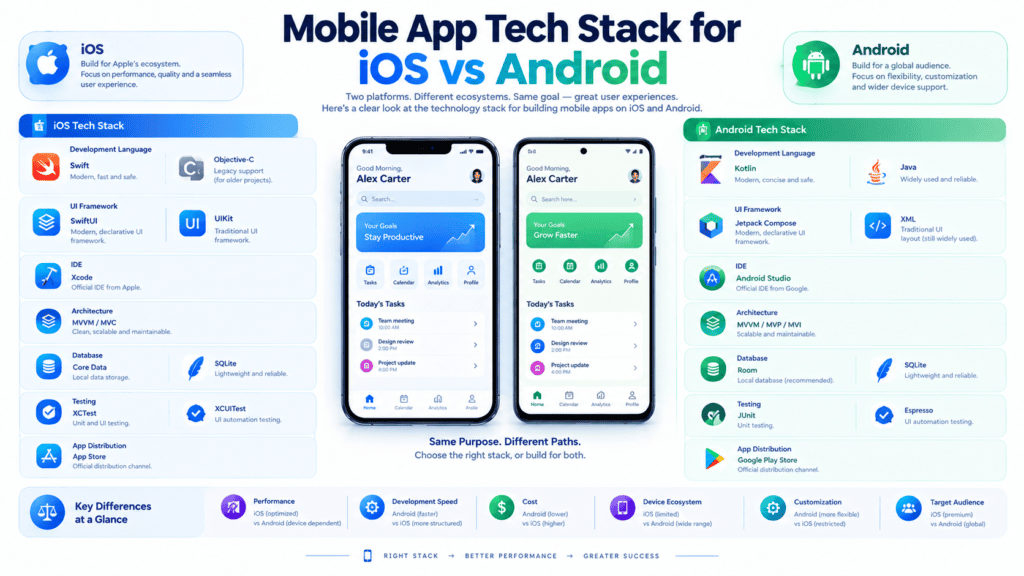
Selecting the appropriate tech stack is one of the most essential choices when developing a mobile application. Having an efficient tech stack guarantees that the project will be high-performing, cost-effective, and scalable; otherwise, it will incur heavy technical debt, delayed launches, and poor maintenance.
The following operational guide will provide an explicit mobile tech stack guide and compare the iOS vs. Android development, backend solutions and databases, and cross-platform trade-offs.
1. Native iOS Development Stack
Apple maintains a controlled, tightly integrated ecosystem of hardware and software, making iOS development streamlined and highly predictable.
- Primary Programming Language:Swift – modern, safe, fast, now the default standard replacing legacy Objective-C.
- UI Frameworks:
- SwiftUI:declarative UI framework used for almost all new development. Fast, little code needed, updates state reactively.
- UIKit: The imperative UI framework used in legacy applications or complex UI scenarios requiring fine-grained view rendering control.
- Integrated Development Environment (IDE): Xcode – Apple’s official IDE encompassing the code editor, interface builders, simulators, performance profiling tools (Instruments), and built-in AI-assisted coding capabilities.
- Local Storage & Database:
- CoreData / SwiftData: Apple’s native framework for persistent object storage and complex relational data management.
- SQLite / Realm: Lightweight alternatives for cross-platform data compatibility with reduced overhead.
- Dependency Managers:Swift Package Manager (SPM) (preferred/native), CocoaPods, or Carthage.
2. Native Android Development Stack
Unlike iOS, the Android platform is distributed across thousands of device models, screen resolutions, and OS versions manufactured by various OEMs (Samsung, Google, Xiaomi, etc.).
- Primary Programming Language:Kotlin – Backed by Google, Concise, null-safe, and 100% interoperable with Java.
- UI Frameworks:
- Jetpack Compose:Google’s modern declarative UI framework (the equivalent of iOS’s SwiftUI), drastically reduces UI boilerplate code than traditional XML layouts.
- View System (XML): Legacy layout structure for maintaining older applications.
- Integrated Development Environment (IDE):Android Studio – built using JetBrains’ IntelliJ Platform and includes powerful emulators, layout inspectors, memory profilers, and Jetpack compatibility.
- Local Storage & Database:
- Room (Jetpack): Object-mapping library providing an abstraction layer over SQLite for simple database access.
- DataStore: Jetpack library for persistent key-value key pairs (replacing SharedPreferences).
- Dependency Manager:Gradle (using Kotlin DSL or Groovy)
3. The Cross-Platform Alternative
If building two native code bases is too time- or budget-intensive for your team, you can leverage modern frameworks and write your code once and compile it for both iOS and Android:
- React Native (Meta):JavaScript/TypeScript-based framework that maps directly to native iOS and Android components. Most suitable for teams already building web applications with React.
- Flutter (Google):Dart-language framework that renders all UI elements itself (with Impeller/Skia rendering engine). Lets you build visually rich apps with custom branding.
- Kotlin Multiplatform: Lets you share your business logic across platforms while writing the native UI code separately (SwiftUI for iOS, Jetpack Compose for Android)
4. Shared Backend & Database Options
Regardless of whether the frontend is built natively or cross-platform, both client apps generally communicate with a single unified backend architecture to synchronize business logic, user auth, and data.
| Backend Category | Popular Tech Choices | Best Use Case |
| BaaS (Backend-as-a-Service) | Firebase, Supabase | MVPs, rapid market entry, real-time sync, small-to-medium apps. |
| Node.js (JavaScript/TypeScript) | Express.js, NestJS | High-throughput apps, shared code types with React Native frontend. |
| Python | FastAPI, Django | Apps with heavy AI/ML integration, data analytics, or complex data processing. |
| Java / Kotlin | Spring Boot, Ktor | Enterprise-grade security, microservices, and high-load production workloads. |
Database Layer Options
                    ┌─────────────────────────┐
                    │     Mobile App Client   │
                    │   (iOS / Android / Cross)│
                    └────────────┬────────────┘
                                 │ REST / GraphQL / WebSockets
                    ┌────────────▼────────────┐
                    │      Backend API        │
                    └──────┬───────────┬──────┘
                           │           │
            ┌──────────────▼───┐   ┌───▼──────────────┐
            │   Relational     │   │   NoSQL          │
            │   (SQL Data)     │   │ (Unstructured)   │
            ├──────────────────┤   ├──────────────────┤
            │ • PostgreSQL     │   │ • MongoDB        │
            │ • MySQL          │   │ • Firestore      │
            └──────────────────┘   └──────────────────┘
- Relational Databases (SQL):PostgreSQL or MySQL. Good for apps that need complex structured data (usually things like e-commerce, financial products or social graph like Facebook or VK.com).
- NoSQL Databases:MongoDB or Firestore/DynamoDB. Good for unstructured data, real-time stuff, fast changes, MVP development.
- In-Memory Cache:Redis to store sessions, do fast reads and rate-limiting.
5. Platform-Specific Considerations
Selecting a tech stack requires balancing market trends, platform constraints, and operational requirements:
Target Demographics & Monetization Strategies
- iOS:dominates the high-end market (North America, Japan, UK), so developing a native app for iOS will help to increase the ARPU and profit from users who are able and willing to pay for high-end products.
- Android:has more than 70% of the market share, which is dominated by emerging markets in Asia and Latin America, where users are more price-sensitive. The monetization strategy should be focused on in-app advertising, subscriptions, or free-to-play with optional microtransactions.
Ecosystem Fragmentation
- iOS: great degree of unification. Small amount of screen resolutions and swift adoption of the latest iOS version by the users significantly reduces the testing and fixing effort.
- Android: extremely fragmented platform, which involves thousands of devices with different custom UI developed by OEMs and varying screen ratios. It is required to perform comprehensive testing (UI automated testing, for example, with Firebase Test Lab).
App Store Approval & Distribution
- Apple App Store has stricter guidelines concerning privacy (App Tracking Transparency), monetization, and UI human interface guidelines (HIG).
- At the same time, the review process takes longer (typically 24-48 hours). Google Play Store is generally less strict about the submission policy; however, recent updates concern target SDK level and permissions. Moreover, updates are typically processed faster than on the Apple platform.
System Hardware Integration
If your app requires background GPS location tracking, Bluetooth Low Energy communication with external devices, custom camera image processing pipelines, or AR/VR computer vision (Apple ARKit / Google ARCore), native development (Swift/Kotlin) is strongly preferred over cross-platform alternatives.
How Much Does a Mobile App Tech Stack Cost?
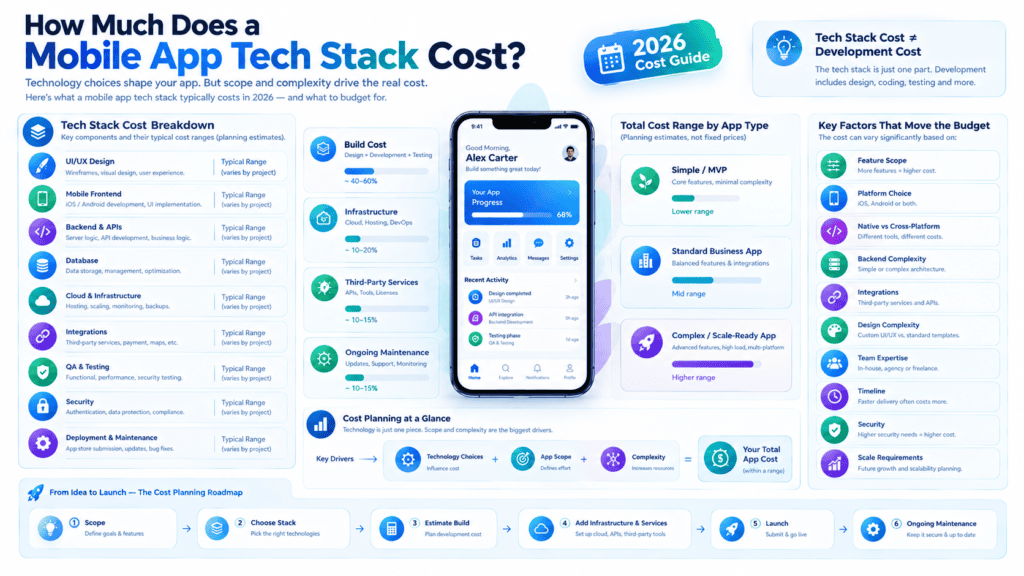
The cost of the mobile app tech stack is determined by the development approach, programming languages, backend infrastructure, third-party tools, and scalability. A mobile app development company should analyze the cost of building the application and its maintenance in the long run.
1. Native Development Costs
Native app development refers to building applications for different platforms using their respective programming languages. For example, developers use Kotlin, Java, etc., for android application development whereas they use swift for iOS app development.
However, developing different apps for different platforms requires comparatively higher time and effort. The cost of developing a native app ranges between USD 20,000 to 80,000 or higher depending upon the apps’ complexity and other features.
This type of application development is appropriate for organizations aiming to leverage the performance of their application and utilize all the available hardware features of a mobile device.
2. Cross-Platform Development Costs
Cross-platform software development enables such companies as Flutter and React Native to provide startups with their mobile applications using one common code. Such an approach allows reducing development time and removing all redundant work.
The cost of cross-platform development may vary from $15,000 to $60,000 or more, depending on the code complexity, backend development, UI/UX design, testing, and other factors.
3. No-Code Development Costs
Bubble, FlutterFlow, Adalo no-code platform allow his user to build apps without extensive coding. Such platforms offer subscription-based plans, which could cost around $20-$300+ per month, depending on particular features, limitations, and hosting. Plus, one would need to invest additional funds in templates, plugins, customizations, and professional support. The no-code approach is great for prototyping, proof of concepts, and MVP development.
4. Maintenance and Scaling Expenses
However, after launch, companies have to plan on spending money on various maintenance and upgrade options. This can include fixing errors, addressing security issues, cloud hosting and database usage, monitoring, and even third-party services and new features. In addition, the costs of maintenance and scaling could add up to 15%-25% of the initial costs, though it could also be significantly higher depending on an app’s specific needs.
Final Consideration
Choosing the right tech stack for a mobile application is not only about saving money on its development. A startup should also consider such factors as speed, performance, security, scalability, and maintenance to get an accurate idea of budget inputs and outputs. Considering all this, it will be possible to find the most cost-effective solution for a given idea without being tied to one technology.
Common Mistakes When Choosing a Mobile App Tech Stack
Choosing the appropriate tech stack for one’s mobile application is considered to be an exceptionally responsible step that requires an O(p) amount of effort. Otherwise, one may waste a lot of time, money, and even fail to deliver the product. Below there are some frequent mistakes developers tend to make that might impact the quality of one’s app.
1. Choosing technologies without considering project requirements
A lot of teams choose their tech stack for the wrong reasons: because it’s the latest rage, someone wants to work with it, some competitors use it, etc. Your MVP with basic CRUD operations will hardly benefit from the same stack as a real-time trading platform or a video-based social network. Define your requirements first and then pick the tools that would best address them. Does your app require offline access to data? Real-time 3D graphics? Native mobile features such as Bluetooth or AR?
2. Overlooking scalability
A stack that can handle ten thousand users is a stack that can fail spectacularly at one hundred thousand. We optimize for get it built fast, but rarely think about what happens once we’re successful. We choose databases that handle hundreds of simultaneous writes, and not databases that handle thousands. We build applications in an architecture that is pleasant to work with, but impossible to horizontally scale. We choose production backend frameworks that wall off under load. It’s not a disaster if you optimize for MVP, but it’s probably time to think about how you’re actually going to grow if you’re doing anything that has even a whiff of critical success.
3. Ignoring developer availability
A technically “perfect” stack is not a good choice if nobody is going to maintain it. No one wants to work on some barely known framework or language. A small community means longer hiring processes, higher salaries, and fragile code that can only be supported by a few experts. Before choosing a certain technology, it is essential to evaluate the size of the developer community, its activity (repositories on GitHub, questions on Stack Overflow), and the potential difficulty of the onboarding process.
4. Underestimating maintenance costs
Choosing a stack is a decision that is not final. A technology stack requires constant maintenance and updates throughout the lifetime of a product. Some technologies are susceptible to technical debt while others require frequent refactoring or upgrades. The cost of the initial development can be minuscule to the costs associated with the maintenance and update cycle of a technology if the former was not considered for the latter.
5. Switching technologies midway through development
Nothing drags down timelines and budgets like a stack change in progress. That typically happens when issues 1-4 above aren’t addressed, and the realization dawns that the architecture chosen isn’t going to scale, there’s no one to maintain it, or that it can’t be maintained at all. The temptation then is to switch stacks, which invariably requires reworking existing code, retraining the team and in many cases, retesting everything from scratch. That’s typically far more expensive than just investing more time in the original evaluation.
The takeaway: a tech stack decision is a strategic one. Discuss it with your development team, plan your growth trajectory realistically, and consider the greater ecosystem of the chosen technology.
Would you like me to present this information in a formatted blog post file (Markdown or Word doc) or help you with the introduction and conclusion sections and SEO-friendly headers?
FAQs
What are the main components of a mobile app tech stack?
A mobile app tech stack comprises the technologies utilized in designing, developing, operating, and maintaining an application.
First, a mobile application Frontend is the technology where the app’s UI and UX take place: it utilizes programming languages such as Swift, Kotlin, React Native, or Flutter to develop apps’ interfaces.
Then, a mobile application’s Backend constitutes its business logic and servers; it is built using programming languages such as Ruby on Rails, Python, Java, or Kotlin and employs software systems such as Parse, Parse Server, or Firebase.
Additionally, databases such as PostgreSQL, MySQL, or MongoDB enable apps to store data about the users and transactions securely. Moreover, mobile platforms and software development kits (SDKs), including Android SDK and iOS SDK, offer tools for developing applications.
Finally, Cloud infrastructure, API, Hosting, Security tools, Analytics, and Monitoring Services are essential for deploying apps to perform reliably, at scale, and stay operational continually.
Which tech stack is best for mobile app development?
There are several choices, for a single best tech stack for mobile app development, which are highly subjective and depend on your requirements and constraints, like any product. A modern mobile application development always consists of a Frontend (UI\Client), Backend (Server\Database), and Supporting Infrastructure.
1. Popular Frontend Mobile Tech Stacks
Option A: Cross-Platform (Best for Startups & MVPs)
Cross-platform development lets you write a single codebase that runs on both iOS and Android, saving up to 40–50% in development costs and time to market.
- Flutter Stacks
- Language : Dart
Rendering Engine : Impeller / Skia
Best For : Apps which need pixel-perfect custom design, advanced animations or need to target multiple platforms (mobile, desktop, web)
Pros : Superior performance, Same look and feel across all platforms, Quick iterations using Hot Reload
Cons : Larger bundle size, Less native feel on some platforms- Language:Dart
- Rendering Engine:Impeller / Skia
- Best For:Apps requiring pixel-perfect custom designs, animations, or multi-platform targeting (mobile, desktop, web).
- Pros:Smooth performance, identical look across platforms, fast UI iteration with Hot Reload.
- Cons: Larger app bundle sizes; non-standard platform feel out-of-the-box.
- React Native Stack
- Language:JavaScript / TypeScript
- Tooling:Expo (standard for setup and deployment)
- Best For:Teams with existing web development skills (React) or apps that rely heavily on native platform components.
- Pros:Massive developer ecosystem, high code reusability, native UI look and feel.
- Cons: Requires native bridges for deep hardware features; bridging overhead for heavy computation.
Option B: Native Development (Best for Enterprise & High Performance)
Native development yields maximum performance, seamless hardware access, and immediate adoption of OS updates. However, you must build and maintain two separate applications.
- iOS Native Stack
- Language:Swift
- UI Framework:SwiftUI
- IDE:Xcode
- Android Native Stack
- Language:Kotlin
- UI Framework:Jetpack Compose
- IDE:Android Studio
Best For: High-performance games, AR/VR apps, applications with heavy hardware integration (Bluetooth, sensor array manipulation), or large enterprise apps.
Option C: Shared Logic / Hybrid Approaches
- The Choice Between Kotlin Multiplatform and PWA/Ionic
- Kotlin Multiplatform (KMP): Enables sharing of business and backend logic between Android and iOS written in Kotlin. It allows for having fully native UIs on both platforms.
- Progressive Web Apps (PWA) / Ionic: Suited for simple, content-heavy applications or for prototyping purposes.
2. Choosing the Backend & Database Stack
A mobile app’s performance relies as much on its backend as its frontend.
| Backend Tech | Common Pairings | Ideal Use Case |
| Node.js / Express | MongoDB, PostgreSQL | Fast JSON APIs, chat apps, startups sharing JavaScript skills across web and mobile. |
| Python (FastAPI / Django) | PostgreSQL, Redis | Data science integrations, machine learning/AI-driven apps, fast API prototyping. |
| BaaS (Firebase / Supabase) | Firestore, PostgreSQL | Early-stage MVPs, real-time sync, automated authentication, and quick serverless scaling. |
| Go (Golang) | PostgreSQL, gRPC | High-concurrency microservices, real-time streaming, scale-stage infrastructure. |
3. Tech Stack Decision Matrix
                          What is your priority?
                                    │
       ┌────────────────────────────┼────────────────────────────┐
       ▼                            ▼                            ▼
Fast Time-to-Market          Maximum Performance           Shared Business Logic
    & Lower Cost            & Platform Integration           with Native UI
       │                            │                            │
       ▼                            ▼                            ▼
Cross-Platform              Native Development           Kotlin Multiplatform
(Flutter or React Native)   (SwiftUI & Jetpack Compose)          (KMP)
Recommendation Summary
- For Startups & MVPs: React Native (with Expo) or Flutter with Firebase/Supabase backend
- For High-End Consumer Apps: Native (SwiftUI + Jetpack Compose) with Node.js or Go backend
- For AI/Data-Intensive Products: Flutter/React Native frontend + Python (FastAPI) backend
Should startups choose native or cross-platform development?
For the majority of cases, cross-platform development (React Native, Flutter) makes more sense as a starting point. With cross-platform, you move faster and make product decisions based on real-world data — critical factors for a young company that needs to iterate rapidly and waste as little time as possible on an idea that may not gain traction. You can always switch to native later if and when you realize that your product needs to offer a truly native experience to succeed.
Native development should be used for projects that require the absolute highest quality UX/UI and technical depth (video editing, AR content creation), or when the app’s core feature is deeply integrated with advanced hardware capabilities. The trade-off for greater performance and UX sophistication is higher costs and slower iteration.
What is the best tech stack for an MVP?
The best tech stack for MVP Development is the one which provides faster development with mature ecosystems and community support rather than over-engineered solutions for long-term scalability.
For web apps, MERN or JavaScript full-stack solutions are the best choice for MVP development (Next.js, Node.js, Tailwind CSS, PostgreSQL). They allow developers to write the same business logic on the frontend and backend sides in one programming language (TypeScript/JavaScript). Moreover, with the BaaS (Backend as a Service) solutions like Supabase or Firebase, you can also skip building the backend from scratch.
For cross-platform mobile MVP development, consider using Flutter or React Native which allow you to build apps for both Android and iOS with one code base.
In any case, the best tech stack for MVP development is the one your team is most experienced in. It is crucial to minimize the time-to-market and reduce costs during the early stages of product development.
How much does a mobile app tech stack cost?
The cost of a mobile app tech stack depends on a number of factors, which include the complexity, approach to development, tech-stack used, and requirements to scalability. The most expensive approach would be developing a native solution for either iOS or Android as the codebase needs to be written twice.
The cost can be reduced by building a cross-platform application where the codebase is built once and would be suitable for both mobile OSes. It is also possible to use no-code platforms offering a budget-friendly solution. However, one should keep in mind that advanced functionality might require a paid plan or custom development.
Apart from development costs, one should also budget for cloud hosting, databases, API services, security, analytics, maintenance, and updates. To conclude, a mobile application tech-stack can vary drastically in price from several hundred dollars for a no-code MVP to tens of thousands for a complex enterprise-level solution.
Can you change a tech stack after development starts?
Yes, but the further you go in the development, the costlier it becomes.
At an early stage: You can switch between frameworks, languages, or databases easily since you have written only a small amount of code that can be tossed away.
At a development midpoint: You can still make the transition but it will require more effort and time.
It is rarely performed when the software is close to release or has been released (late adopter scenario): Usually, companies opt to replace individual elements (databases, front-end frameworks, etc.) rather than the whole technology stack at once.
The earlier you decide to switch, the smaller the codebase you will have to rewrite (preferably only business logic), and the cheaper the transition will be. The later you switch, the more likely you are to make incremental replacements (rather than rewrite everything at once) and keep your existing codebase intact. The most important feature for easy late adoption is the ability to isolate your code (loose coupling).
Do iOS and Android require separate tech stacks?
No, iOS and android do not have to use separate tech stacks. It all depends on your performance, budget, and approach.
1. Native Approach ( separate tech stack )
Building apps natively means that you are going to be using technologies specific to each platform:
IOS: Swift / SwiftUI + Xcode (ide)
ANDROID: Kotlin / Jetpack compose + Android studio (ide)
It will require you to have separate code bases for each platform, but it will also give you the best performance and access to all the features and hardware of a device. The team will also be bigger since you need people who know how to code in those specific languages.
2. Cross-platform approach (unified tech stack)
As mentioned above, if you want to save time and money while still having a good product, you can go with the cross-platform approach. You can use flutter (dart) or react native (javascript) to code once and deploy on both android and ios. You will have around the same performance as native apps but with less coding. You share almost 80-90% of code between android and ios which makes development faster.
Summary
If you are building a very complex app that requires a lot of hardware usage, you should probably go with the native approach. Hardware like 3d renderers or things similar to that require a lot of performance, and you would not be able to achieve that with a cross-platform approach. If you are building a regular app for consumers or enterprises, you should go with a cross-platform approach because it would save you a lot of time and money.
Conclusion
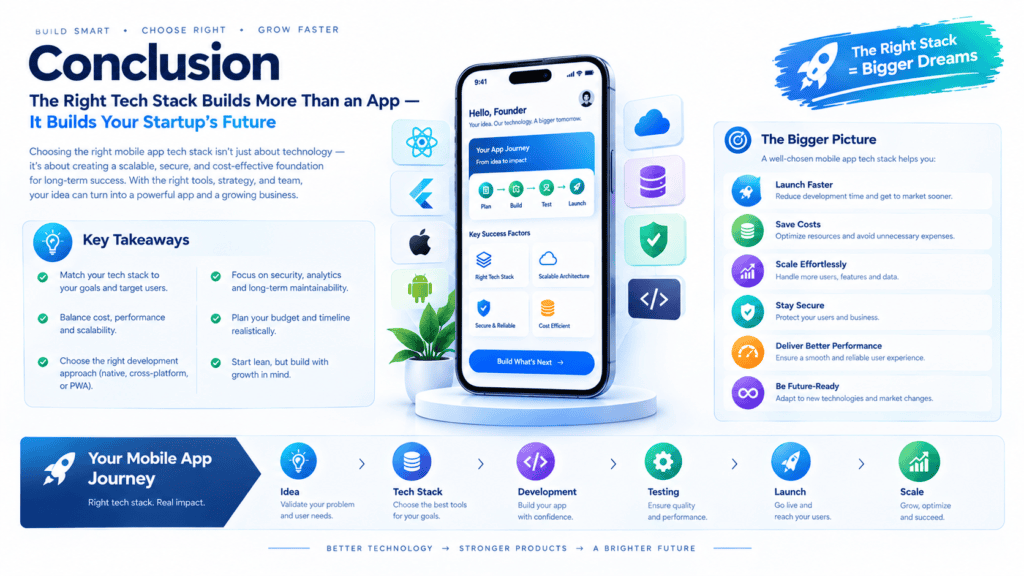
What to choose for cross-platform mobile app development: native, hybrid, or web? The choice of the tech stack for developing a mobile application is a challenging issue. A company should evaluate its current budget, timeline, audience, and feature scope.
For instance, the native tech stack (Swift, Kotlin) is the best choice for graphic-intensive apps (games), or products requiring heavy hardware interaction. In other cases, React Native or Flutter are viable alternatives to reduce time-to-market and maintain a high level of performance.
The no-code platform is a perfect solution for PWA apps for a proof of concept (PoC) or non-technical founders who want to build an MVP (minimum viable product). A professional code audit will help choose the best cross-platform tech stack for a mobile app.
Author Bio
Jeevesh Tripathi is a passionate digital content creator and technology enthusiast contributing to BkAbhi. Specializing in modern web technologies, mobile application frameworks, and software architecture, Jeevesh creates actionable guides, technical insights, and emerging tech breakdowns designed for developers, startups, and product leaders. With a strong commitment to simplifying complex digital concepts, he focuses on delivering high-value content that helps brands, developers, and tech entrepreneurs make informed decisions and build scalable digital solutions.