
Table of Contents
What Is a SaaS MVP?
A SaaS MVP (Minimum Viable Product) is the simplest version of a software-as-a-service product that solves a particular problem for the user and tests a potential product concept with minimal time and effort investment. A SaaS MVP lacks some of the features that the product is expected to have, focusing on those that would deliver essential value to the user.
A SaaS product’s MVP aims to collect user feedback by introducing the product to the market. As such, it enables the founders to make alterations based on data, ensuring that the final product addresses the user’s needs. For instance, the MVP for a project-management SaaS product may have features such as user accounts, project creation and management tools, and notifications.
More advanced functions, such as artificial intelligence, complex analytical tools, and third-party application integration, can be added later based on the received feedback.
How to Budget for a SaaS MVP: Key Differences Explained
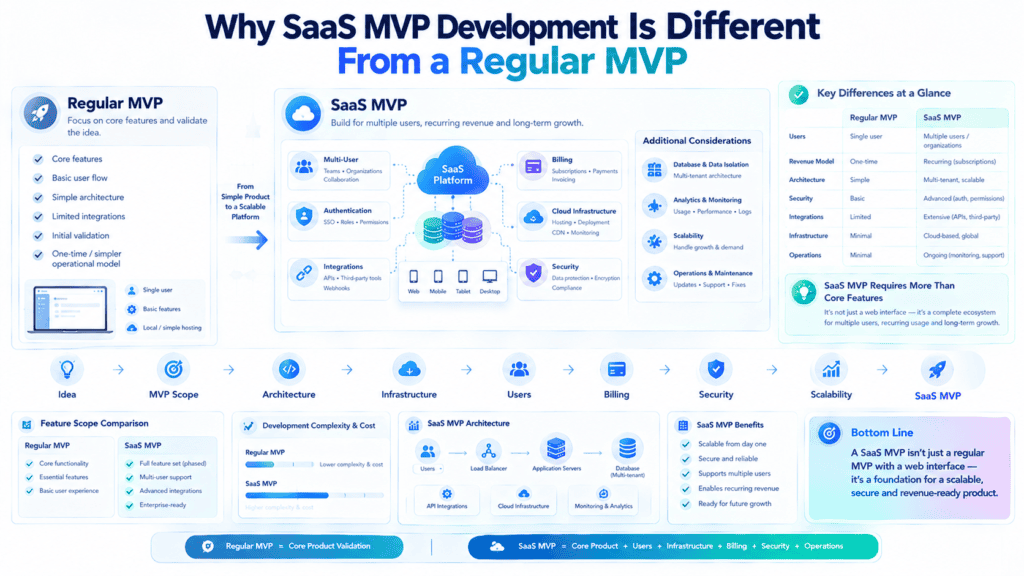
Why developing SaaS MVP is fundamentally different than developing a regular MVP
Creating a Minimum Viable Product is a concept many startups and product companies embrace while trying to get their idea out there. At first glance, it seems like a no-brainer to reduce the scope of your solution to its bare essentials and get building.
However, there are nuances that make this seemingly generic concept incompatible with certain product types, which is why creating an MVP for a SaaS company is significantly different than a regular product
What follows is a list of essential elements every SaaS MVP development process should consider that are not a thing for regular MVPs.
Subscription and Billing
A regular MVP doesn’t usually involve a billing system, unless you’re selling hardware. For a SaaS product, the MVP billing solution is production-grade and has most of the critical features your money-making machine will need to support its growth trajectory in later stages.
This includes but is not limited to
- billing cycles
- plan upgrades/downgrades/prorations
- taxes
- trial sign-ups and conversions
- dunning management
- invoicing
- compliance with local laws and regulations
Plus, you’ll need to integrate it with a payments processor (Stripe, Paddle, etc.), which is a non-trivial amount of work to say the least. All of this is to say, billing for a SaaS product is an integral, deeply integrated part of the system and cannot be rushed or outsourced to a third party until you’ve designed the billing solution for your MVP.
Users and Permissions
The regular kind of MVP is usually geared toward a single user interacting with the product in a certain capacity. While this design philosophy can be used for a SaaS product, it usually doesn’t scale well and has been known to lead to disastrous user experience and customer support issues down the line.
SaaS products usually have to accommodate not just single users but entire organizations and teams, which means implementing an internal permissions system and having roles that dictate what a user can and cannot do within the application.
You also need to think about
- organization-specific data storage
- invites and permissions management
- team management
- user permissions
All of these are pretty much table stakes for any SaaS product that has any aspirations of serving enterprise customers. The only way not to think about user accounts and permissions in your SaaS MVP is to design it for a single user only.
Onboarding and Retention
One of the key ideas behind an MVP is to test your core hypothesis about the product’s viability by getting someone to use it, ideally in a frictionless way.
For a regular product, this can be achieved by reducing the onboarding to a minimum but for a SaaS product, onboarding is an integral part of the user’s journey and cannot be ignored.
You should think about how to guide your end-users through their first session and make sure they’ve reached an “aha moment” and ideally set them up for long-term success with your product.
SaaS companies should also think about retention in a more involved way than regular products. That means designing the application so that returning users have an equally seamless or more engaging experience, creating in-app/email prompts for users who haven’t engaged with the application in a while, and having an intelligent offboarding process to identify and qualify lost/recurring revenue.
Without an onboarding process to analyze, measure, and learn from, your SaaS MVP can’t truly be considered a Minimum Viable Product, at least not one that serves its purpose.
Product analytics
When it comes to analytics, a regular MVP doesn’t really have to incorporate any meaningful product analytics solutions at its launch. It can rely on customer support emails and basic quantitative user behavior analytics that come built into the platform or are easy to set up.
For a SaaS MVP, analytics are an essential part of the system, and you should have instrumentation to measure the most important engagement metrics like activation and time to value at a cohort level, at the very least.
You’ll also want to keep track of your
- trial to paid conversion
- churn rates
- feature usage
- other important metrics that tell you if your SaaS product is capable of driving consistent, predictable revenue
- in a way comparable to later stages of development.
The bottom line is that a regular MVP typically revolves around a single user interacting with a product in a very limited way, primarily to see if they like it.
In contrast, a SaaS MVP should have enough analytical instrumentation to identify the critical engagement levers for the product at each stage, including activation, retention, and expansion, which is crucial to its ability to generate ongoing revenue and thus be considered a viable business.
Core SaaS MVP Features to Prioritize
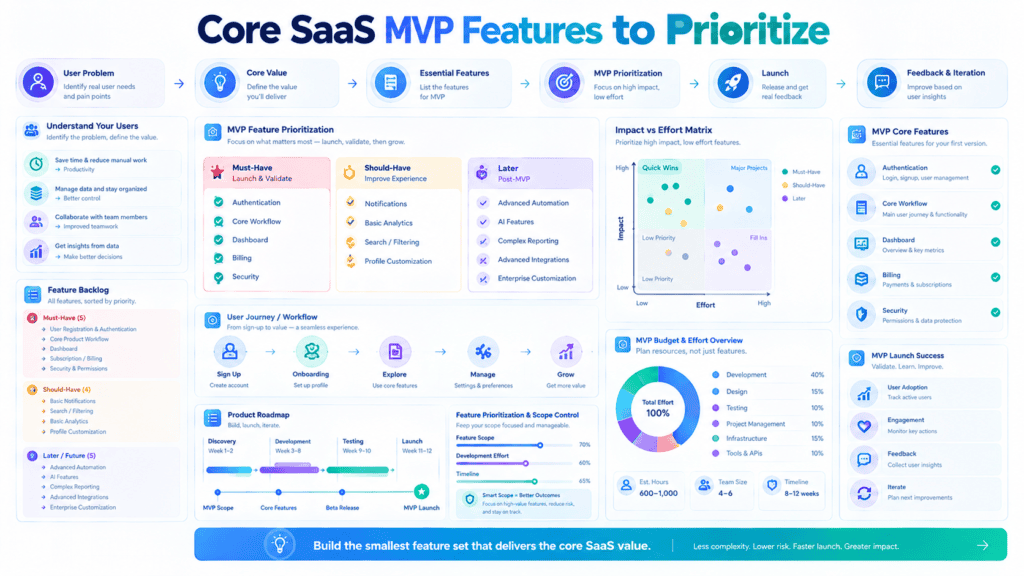
Launching a Software-as-a-Service product is not an easy task. The main problem that young startups face is not a lack of features; it is the inability to resist the temptation to implement unnecessary scope.
When building a Minimum Viable Product, all your development efforts should be concentrated on a single goal — helping the user to reach an “Aha!” moment as quickly as possible.
Below is the list of features that you might want to include in your SaaS MVP in order to increase the chances of success.
Authentication and Account Setup
The authentication system is one of the “plumbing” facets of your application that should be designed to reduce friction as much as possible. As a rule of thumb, the fewer account-related options you offer during the onboarding experience, the better.
What to include
OAuth: The easiest way to setup an initial working prototype is to use an “OAuth provider” such as Google, GitHub, or Work Email. This will save you hundreds of hours of development time and reduce the number of options during registration.
Profile: When using an OAuth provider, ask the user for a minimal amount of personal information that would help you customize the experience (e.g., Name, Company Name).
What to defer
Multi-factor authentication: At the MVP stage, it is better to avoid any security-related complexities.
Social logins: Again, this is a distraction. Avoid unless you are launching a SaaS product with an exclusive focus on enterprises.
Implementation note: Do not re-invent the wheel. Use existing identity providers (Auth0, Firebase, Clerk, Supabase Auth).
One Core Workflow (The Engine)
One of the defining characteristics of a Minimum Viable Product is a presence of one core workflow that is implemented to the point of being shippable. The engine is the feature that solves a primary problem that brought users to your SaaS product.
What to include
The happy path: The absolute simplest set of steps needed to accomplish the main goal of your application. For example, if you are building a tool for generating AI-powered email messages, the core engine would be a text generation system that converts a prompt into an email message which can be edited or shared by a user.
Friction: Reduce the number of steps and files needed to complete the main task.
What to defer
Edge cases: There is no need to over-engineer the system at the MVP stage.
Implementation note: Ask yourself this question: “If I removed all other screens, would this single screen still solve some user problems?” If the answer is yes, then you have identified the core engine.
Subscription and Payment Path
Unless you are building a fundamentally different type of a business (not a Software-as-a-Service company), it is vital to have a working subscription and payment system. It will allow you to monetize your product and focus on your users’ problems, rather than a constant struggle to survive.
What to include
Billing: One or two subscription tiers with a simple pricing plan. Do not forget about the free tier or a possibility to upgrade/downgrade.
Self-serve: A self-serve checkout experience and a simple billing console to manage subscriptions.
What to defer
Custom pricing: Unless you are targeting a very specific audience (enterprise SaaS), avoid the complexity of custom pricing.
Implementation note: Use existing hosted solutions (Stripe Checkout, Paddle, Lemon Squeezy).
Admin Panel and Internal Dashboard
When launching an MVP, building a working admin panel in order to manage the business becomes a critical priority.
What to include
User management: The ability to view user data, manually reset passwords, change subscriptions, etc.
Support: Logging and debugging tools to help you understand what happens when a user performs a certain action.
What to defer
The custom admin interface. This is an enormous waste of time and resources. Use existing tools (Retool, Forest Admin, or your framework’s built-in administration tools).
Role-Based Permissions (RBAC)
If you are building a B2B SaaS product, chances are that there will be a need for teams to collaborate and share data. However, at the MVP stage, it is vital to design the system so that permissions are as simple as possible. One of the best options is to follow the standard organization tenancy practice and give access to resources (data, files, workspace) based on the user’s Account rather than User.
What to include
Basic roles (Owner vs Member):
Owner/Administrator: Can change subscriptions, add/remove team members, and perform all other actions.
Member: Can use the core engine, but cannot add teammates or change the billing information.
What to defer
Custom roles and teams: Delay any attempt to create sophisticated permission systems. For now, use the simplest solution possible.
Basic Analytics and Activation Tracking
At the MVP launch stage, the collection of product analytics becomes more important than revenue. In order to determine whether your product is experiencing activation, it is useful to implement a few activation tracking events.
What to include
Activation tracking: A set of analytics events that represent the activation funnel. For example, if your SaaS product is an invoicing tool, you might want to track the following events: Signed Up, Created First Workspace, Sent First Invoice, Completed Onboarding.
Analytics dashboard: A simple analytics tool to keep an eye on daily and weekly active users.
What to defer
Custom dashboards and activation scoring: At the MVP launch stage, use an existing product analytics tool (such as PostHog or June.so). Define between 3 and 5 activation events. Decide which events indicate that a user has experienced activation.
Essential Integrations
Unless you are building a fundamentally different type of a product (a standalone application with no external dependencies), it is a good idea to implement at least one integration. The rationale is that most SaaS products are not used in isolation; therefore, your users are likely to want your product to work with their existing tools.
What to include
Primary destination/source: A set of essential tools that your users would want to connect to in order to accomplish their primary goal. An example of a good integration would be Slack notifications or the ability to import/export documents from Google Drive.
What to defer
Everything else. The main reason to avoid multiple tool-specific integrations is that each one takes hundreds of hours to implement.
Summary
When considering a feature for inclusion in your SaaS MVP, try to classify it into one of the following categories.
Category MVP action Strategy
Must-have Feature to build as part of MVP Core product engine, authentication, billing, activation tracking
Nice-to-have Buy or use a third-party solution Use existing tools (e.g., Stripe Checkout, Auth0, Retool, Posthogg)
Distraction Defer to a later date Custom roles, MFA, complex permission systems, overthinking integrations
The final rule of thumb is to defer any feature that does not directly contribute to your ability to demonstrate that your users have a problem that you can solve. If you are not sure if a certain feature falls under the “must-have” category, defer it to a later date.
SaaS MVP Tech Stack: What To Choose Early
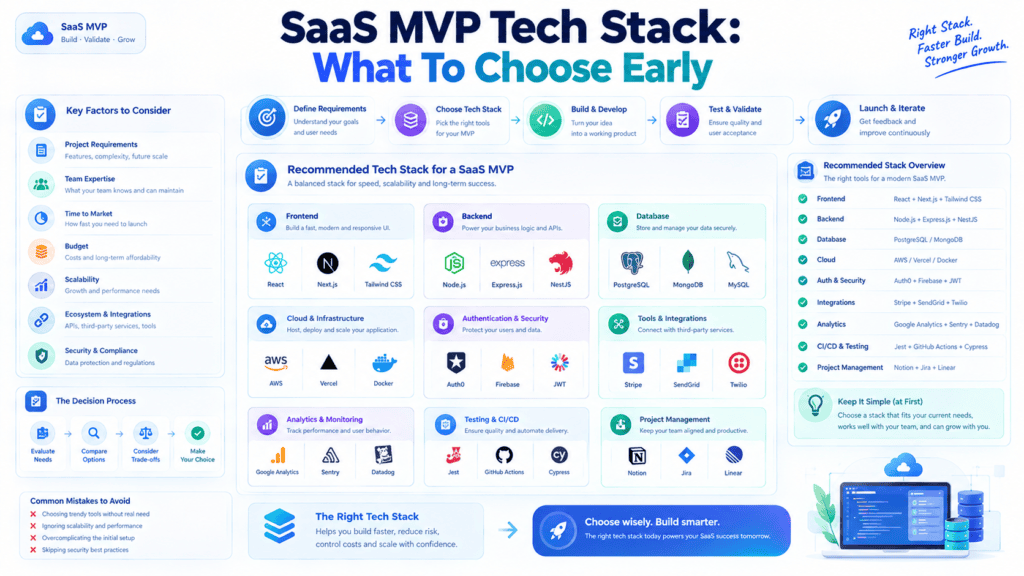
When choosing the SaaS MVP tech stack, one should focus on the development speed, scalability, security, and cost-effectiveness. In this list, one can find the frontend and backend coding languages and tools, databases, billing and authentication platforms, analytics, and cloud providers.
For the frontend development, it is possible to choose between React, Next.js, Vue.js, or any other UI framework. As for the backend, Node.js, Python, or Ruby on Rails are popular options.
These programming languages are productive, scalable, and secure, and their demand makes them cost-effective.
PostgreSQL is suitable for most web apps, but some prefer MongoDB. In terms of billing and authentication, one should explore Auth0, Clerk, Stripe, and Paddle.
When it comes to analytics and error tracking, Google Analytics, PostHog, Sentry, and Datadog are great choices.
The cloud platform can be AWS, Google Cloud, Azure, or Vercel, and the infrastructure-building toolchain may also include GitHub Actions, GitLab, or Sentry. For MVP development, it is advisable to choose the tools that the team is already familiar with rather than what they will use later.
The SaaS MVP Development Process: A Complete Guide
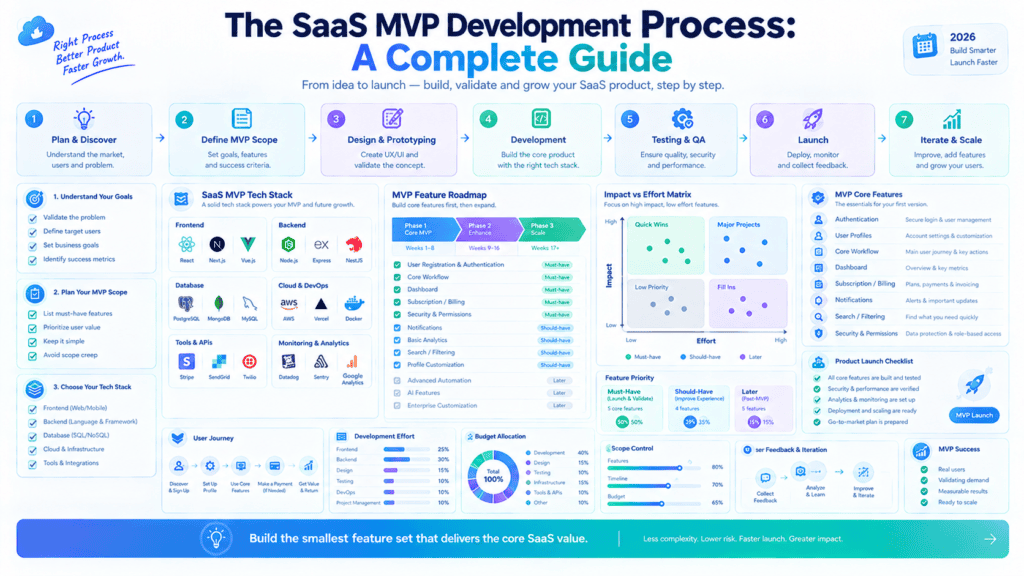
Creating an MVP (Minimum Viable Product) SaaS is not just another phase in building a product. It is more of a trial — one should invest as little time and effort as possible in order to test whether the product idea is viable. Below are the main stages of this process.
1. Product Discovery and Validation
Before you start writing a single line of code, you need to make sure that there is a problem worth solving and people are actually willing to pay for your solution. This essential step includes customer discovery, competitive research, and defining your value proposition.
By conducting customer interviews, surveys, and even launch landing page tests, you can avoid the risk of failing as most SaaS products are not successful precisely because of this stage being neglected.
Key outputs: problem statement, target user personas, competitive analysis, and a clear value proposition.
2. UX/UI Design
Once a problem and audience are validated, design transforms an idea into a design space by developing user flows and wireframes that define how a user will interact with a product to reach their desired outcome. It is followed by high-fidelity mockups and a clickable prototype.
The key to a good MVP design is having information architecture on every screen so that a user at first glance understands the product’s value.
Key outputs: wireframes, prototypes, design system basics (colors, typography, components).
3. Architecture Planning
This section concerns the technical specifications. The decisions made here, including database schema, programming languages, API, hosting platform, and third-party services, among others, should ensure that the product may be developed and scaled efficiently.
It is especially critical for MVP (Minimum Viable Product) to plan the system architecture rationally so that it would be possible to upgrade the platform without significant code rewrites. Such details as multi-tenancy strategy, user authentication, and data encryption also fall under this category.
Key outputs: system architecture diagram, tech stack decisions, database schema.
4. Core Development
This stage represents the implementation of the product, which is usually split into two streams: backend (business logic, API, database) and frontend (interface and client-side logic) development.
When building an MVP, it is essential to focus on features that support the product’s core value proposition and avoid designing irrelevant “nice-to-have” functions. Agile sprints allow for continuous development and improvement of the product based on the received feedback.
Key outputs: working backend and frontend, core feature set, admin dashboard (if needed).
5. Integrations
Most SaaS products need to integrate with payment gateways (Stripe, PayPal), identity providers (Google, Auth0), email services, analytics platforms, and sometimes CRMs or other business tools.
These connections need to be architected from the start, but they usually come after the main development work is done.
Key outputs: payment processing, third-party API connections, analytics tracking.
6. Testing and Validation
Before launch, the product needs to undergo rigorous testing: testing its functionality (does it perform as intended?), usability (can regular users manage it without frustration?), performance (how does it behave under loads?), and security (is user data protected from external attacks).
One of the best ways to test the product ahead of a public launch is to use it in a beta test with a small group of users. This way, bugs that regular customers would encounter can be identified and fixed before the launch.
Key outputs: bug-free core flows, QA reports, beta user feedback.
7. Deployment and Iteration
Launching an MVP is NOT a finish line. It’s a starting point. You have to launch the product, track the metrics (activation, retention, etc.), collect the feedback (in-app surveys, support tickets, interviews), and use this information to build the next version of your product.
Key outputs: live product, analytics dashboards, prioritized roadmap for v2.
The bottom line is that MVP is not a reduced version of the final product but the fastest and cheapest way to test the product in the marketplace. All these seven stages are there to mitigate risks before you scale up your product.
Want this formatted as a downloadable document, or would you like me to expand any section (e.g., typical timelines, costs, or tech stack recommendations) for the blog post?
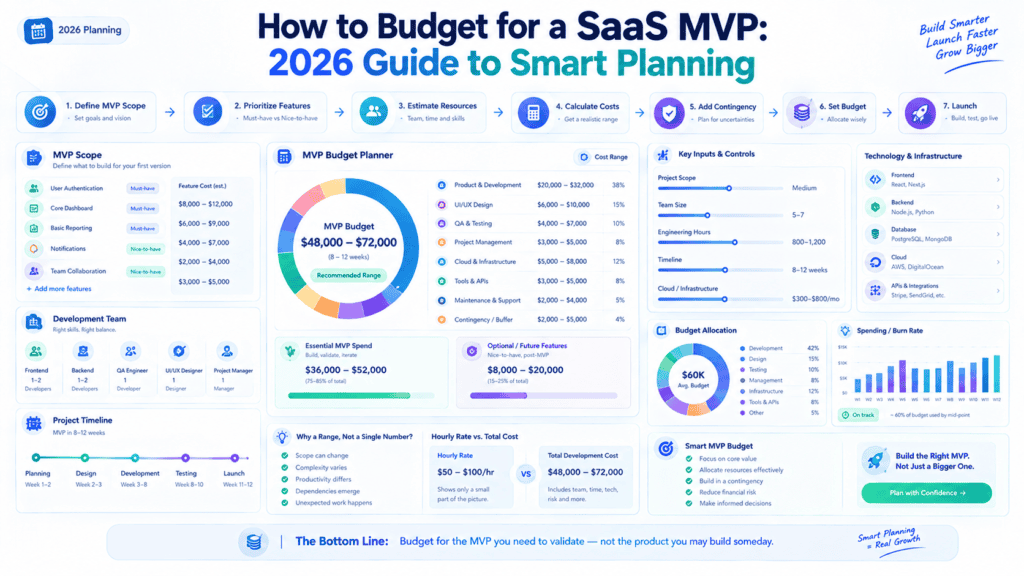
SaaS MVP Development Cost and Timeline: A Complete Breakdown
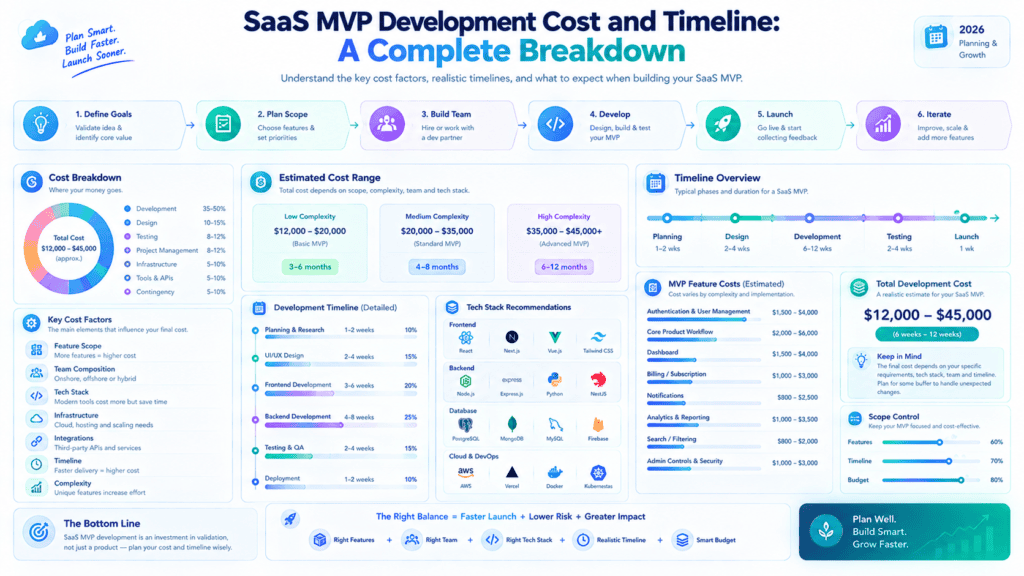
Usually, building a minimum viable product (MVP) is the first step in validating a SaaS idea — and the question that SaaS startups ask most frequently is how much it will cost and how long it will take.
The truth is, there is no universal answer, but the list of influencing factors is predictable. Below are the most common elements that make up the cost of SaaS software MVP.
Key Factors Affecting Development Cost
Several variables combine to determine your final price tag:
- Team composition – in-house team, a freelance network, or an outsourcing company have dramatically different rates per hour
- The developers’ location – rates can vary significantly depending on whether you hire people in North America, Western Europe, or somewhere in South Asia or Eastern Europe
- The tech stack – some programming languages and frameworks are more productive or less costly than others
- Design requirements – custom designs take more time and effort, hence they are more expensive than using standard design systems and templates
- The number of user roles – the more roles (permissions) your application needs, the more complex it is to develop and maintain
Development Scope and Complexity
This is usually the single biggest cost driver. Scope complexity includes:
- Number of core features — a basic MVP with 3-5 features will be considerably cheaper than attempting to recreate a mature product
- Custom vs. standard functionality — a simple CRUD app will be significantly less expensive than one that requires AI or real-time collaboration features
- Platform requirements — a web-only application will be substantially cheaper than one that also requires native iOS/Android apps
- Data complexity — designs that require multi-tenant architecture, relational databases, or heavy data lifting will see costs increase considerably
Rule of thumb: A simple SaaS MVP (web-only, 3–5 features) can run $15,000–$40,000, while a moderately complex MVP with multiple integrations and platforms can reach $50,000–$150,000+.
Integration and Infrastructure Costs
Most SaaS products are not developed in isolation: they require integration with external services, which increases both development costs and complexity:
- Third-party APIs (payment gateways like Stripe, email services, analytics, CRMs)
- Cloud infrastructure (hosting, CDN, databases)
- DevOps infrastructure (CI/CD, containers, staging environments)
- The ability to scale the product architecture without incurring significant costs
Even a minimal MVP requires at least 2-5 third-party service integrationsm (payments, auth, email, analytics), and each one adds development time and ongoing subscription costs.
Security and Compliance Costs
Often underestimated but vital for B2B SaaS or data-intensive products:
- Authentication and authorization mechanisms, including single sign-on for enterprise sales
- Encryption of data at rest and in transit
- Regulatory compliance (GDPR, HIPAA, SOC 2, etc.) depending on the markets/geographies targeted
- Security audits and penetration tests (especially required by big companies before signing contracts even at the MVP stage)
- Legal consultations and paperwork (privacy policy, terms of service, data processing agreements)
Compliance-heavy verticals (healthcare, finance, government, etc.)als (healthcare, fintech, legal tech) can add 20–40% to overall cost due to these requirements alone.
Post-Launch Support
Cost doesn’t end at launch. Budget for:
- Bug fixes and stabilization — the first few weeks post-launch almost always surface issues
- Monitoring and maintenance — uptime monitoring, server costs, performance tuning
- Iterative updates — feature refinement based on real user feedback
- Customer support infrastructure — even a basic helpdesk tool or chatbot
A common budgeting practice is to reserve 15–20% of the initial development cost annually for maintenance and support.
Timeline Considerations
For a realistic MVP, timelines generally break down as:
| Phase | Typical Duration |
|---|---|
| Discovery & planning | 1–2 weeks |
| UI/UX design | 2–4 weeks |
| Core development | 6–12 weeks |
| Testing & QA | 2–3 weeks |
| Deployment & launch prep | 1–2 weeks |
Total: roughly 3–5 months for a well-scoped MVP. Adding native mobile apps, complex integrations, or compliance requirements can push this to 6–9 months.
Final Thoughts
The biggest lever founders have over cost and timeline is scope discipline. The tighter and more focused your MVP’s feature set, the faster and cheaper it is to build and get feedback from users to determine what comes next.
Most successful SaaS products did not release their product with all the features they had envisioned, but rather a minimal set needed to demonstrate core value and then iterated from there.
Common SaaS MVP Mistakes
Building a SaaS MVP is all about getting your core product idea validated without having to spend too much time or resources. But there are some things to avoid doing to make sure it doesn’t turn into something that doesn’t deliver what you think people need.
- Building too many features: Creating extra functionalities may require much time and effort, and it can become hard to differentiate between what users need and want. It is better to design a relevant feature set that would address the main problem.
- Not establishing a good onboarding process: Even the best app can fail if the users do not know how to use it. The sign-up process and the first-time experience should be intuitive and provide ample guidance.
- Lack of analytics: It is impossible to track the product’s success without relevant analytical tools. One should set up dashboards that would help monitor progress, product-market fit, and ongoing adoption and retention rates.
- Not planning the permissions system: Most SaaS products require end-users to have permission to access specific features. The roles and permissions should be designed during the planning stage to avoid additional costs and security issues during the development stage.
- Inadequate project scoping and planning: Without a proper backlog prioritization and a detailed product plan, it can be hard to estimate costs and timelines. The product owner should create project milestones, define technical requirements, acceptance criteria, and success metrics during the scoping and planning stage.
Post-Launch SaaS MVP Optimization: How to Turn Early Users into Growth Drivers
Launching your SaaS Minimum Viable Product (MVP) is just the beginning. The real work starts after you hit launch when actual users start interacting with your product.
The optimization of post-launch SaaS is a continuous process during which you learn from user behavior, identify pain points, and improve the product to drive retention before investing significantly in customer acquisition.
Below are the key areas that you may want to optimize after the SaaS product launch and continuously during the product’s life cycle.
1. Tracking User Behavior: Uncovering the “What” and “How”
Before diving into product fixes, see what your users do within the product. Getting sign-ups is one thing, but you should be measuring analytics in the form of events along with a session.
Quantitative Data: Event Tracking
Set up tools like Mixpanel, Amplitude, or PostHog to track discrete user actions, not just pageviews
Track these crucial events:
- account creation
- setup completion
- use of your main feature
- invites sent
- exports initiated
- upgrade clicked
Build a funnel out of your most important acquisitions (sign-up $\rightarrow$ onboarding step 1 $\rightarrow$ workspace created $\rightarrow$ first task completed) and see where the largest drop-off points are.
Qualitative Data: Visualizing the Journey
While quantitative data will tell you where people are dropping off, qualitative data will explain why.
- Session Replays (Hotjar, Clarity, FullStory): Review sessions of people who dropped off during onboarding and look for rage clicks, dead clicks (people who left immediately), or confusion with the interface
- Heatmaps: See which buttons are being clicked on, as well as high-value elements that are being completely ignored.
2. Measuring Activation and Retention: The True Predictors of Health
Acquisition means nothing if your product is a leaky bucket. To build a sustainable SaaS, focus on turning new sign-ups into habitual users.
 Sign-ups ──> Onboarding ──> Activation ("Aha!") ──> Retention ──> Scale
                                   │
                           Focus Here First
Defining Your Activation Metric (“Aha!” Moment)
Activation is an ongoing engagement: that’s when users get real value out of using your SaaS.
- Slack: sending 2,000 team messages.
- Dropbox: putting one file in a folder on one device.
- And your SaaS: what is the core behavior that’s most likely to lead to retention?
Tracking Retention Cohorts
Use Cohort Analysis to measure your Day-over-day/Week-over-week retention rate.
- N-Day Retention: Percentage of Users acquired on Day 0 that return on Day 1, 7, or 30?
- Flattening the Curve: As your retention curves should slope downwards to the right, but should eventually flatten out, roughly parallel to the x-axis. If it continues to trend towards 0% it means you don’t have Product-Market Fit (PMF)
3. Gathering User Feedback: The “Why” Behind the Numbers
Data shows you behavior patterns, but direct user feedback gives you explicit direction on what to fix next.
Micro-Feedback & In-App Surveys
Make feedback loops easy to complete and use:
- In-App Prompts: Conduct a 1-question survey right after completing an action (e.g. How easy was it to generate this report?)
- PMF Survey (Sean Ellis test): Ask active users: “How would you feel if you could no longer use [Product]?” If $\ge 40\%$ say “Very disappointed”, then you are achieving Product-Market Fit.
Qualitative Interviews
Reach out directly to two specific groups:
- Power Users: Ask what capabilities they couldn’t live without and how they incorporated your product into their daily workflow.
- Churned / Inactive Users: Ask what caused them to get stuck, what expectations weren’t met, or what alternative product they adopted. Offer some incentive (e.g., $15 GC) to participate in a 15-min conversation.
4. Iterating Based on Data: Prioritizing the Roadmap
With feedback and tracking in place, you will likely have dozens of feature requests and bug reports. The challenge is deciding what to build next without bloating your MVP.
Framework for Prioritization
Use a simple framework, like RICE or ICE, to objectively evaluate your incoming requests:
$$\text{RICE Score} = \frac{\text{Reach} \times \text{Impact} \times \text{Confidence}}{\text{Effort}}$$
- How many users will be affected by this change, request, or issue?
- How much will it improve activation or retention?
- What confidence level do you have in these numbers?
- How many engineering days will this request take?
Fast vs. Slow Iteration Cycles
- Quick Wins (Fixes & UX Polish): Ship small fixes as fast as you can (1–2 day cycles), targeting obvious conversion roadblocks.
- Loops (1–2 Week Sprints): Focus your dev resourced on features directly tied to activation or retention that you can build and test within a 1–2 week period.
5. Preparing for Product Scaling: Building the Foundation
Once your retention curve flattens and users are consistently reaching activation, shift your focus toward infrastructure, operational, and architectural scalability.
| Optimization Area | Focus Points |
| Technical Infrastructure | Move from rapid prototype setups to scalable architecture (auto-scaling servers, database indexing, caching layers like Redis, CDN integration). |
| Monetization & Pricing | Test pricing tiers based on usage limits or value metrics discovered during the MVP phase. |
| Self-Serve Onboarding | Automate manual onboarding steps with interactive product tours (e.g., Userflow, Appcues) and automated email drip sequences. |
| Customer Support & Docs | Create a searchable knowledge base and introduce automated support bots for common queries to reduce manual founder support. |
Final Thoughts: The Post-Launch Optimization Loop
Optimizing a SaaS MVP is not a line but a cyclical flywheel:
$$\text{Track Behavior} \longrightarrow \text{Measure Metrics} \longrightarrow \text{Gather Feedback} \longrightarrow \text{Iterate} \longrightarrow \text{Scale}$$
By focusing on activation and retention before scaling efforts into acquiring new users, you get to make every dollar and hour spent on the former compound into exponential growth for the latter.
Author Bio
Jeevesh Tripathi is a thinker and writer who focuses on technology and modern culture. He likes to stay on top of the latest trends, which allow him to observe his surroundings more closely.
By doing so, he finds inspiration for his article writing and other creative projects. This talented professional actively researches various subjects and shares his knowledge and thoughts in a well-structured manner, making his articles highly informative.
Jeevesh constantly strives to improve his analytical skills and encourage others to think critically while providing viable solutions for the modern world.
Through his work with bkabhi, he explores emerging technology trends and shares practical insights with readers. In his free time, he reads about different topics and interacts with his peers in the industry.