

A startup doesn’t necessarily need a custom website just because it plans to grow. It also doesn’t necessarily need WordPress just because the first version needs to be inexpensive.
The better question is: what job does the website need to perform?
If the site mainly needs to explain the company, publish content, collect leads, and support marketing, WordPress can be a practical choice.
If the “website” needs user accounts, dashboards, custom workflows, subscriptions, complex integrations, AI features, automation, or product-specific business logic, you’re moving into application development territory. A custom-built solution may make more sense.
The difference isn’t simply WordPress versus code. It’s content platform versus product architecture.
Table of Contents
Quick Answer
For most startups that need a standard marketing website, blog, landing pages, or relatively straightforward content-driven experience, WordPress is usually worth evaluating first.
Custom development becomes more compelling when the website itself is part of the product, requires unusual business logic, depends heavily on custom integrations, or needs application-style experiences such as dashboards, multi-tenant accounts, complex permissions, or real-time workflows.
There is also a third option: use WordPress for the marketing site and a custom application for the product.
That hybrid approach can prevent a startup from overbuilding its public website while still giving the product room to evolve.
The First Question: Are You Building a Website or a Product?
This is the question founders should answer before choosing technology.
Imagine a startup needs:
- Home
- About
- Pricing
- Blog
- Contact
- Lead forms
- Testimonials
- Case studies
That’s primarily a website.
Now imagine another startup needs:
- User registration
- Customer dashboards
- Role-based permissions
- Subscription billing
- Data processing
- API integrations
- Automated workflows
- AI functionality
- Usage tracking
- Account-specific data
That’s much closer to a software product.
Both can technically be called a “website,” but the engineering problem is completely different.
WordPress is designed as a content management system that can be extended through plugins and custom development. Custom web applications are designed around the business logic the product actually needs.
That distinction should drive the decision.
What Is a WordPress Website?
WordPress is an open-source content management system.
Instead of building every content-management feature from scratch, a startup can use WordPress’s existing administration system, themes, blocks, plugins, and APIs.
Plugins extend WordPress functionality without modifying the WordPress core. The official WordPress documentation describes plugins as packages of code that extend core functionality.
That ecosystem is one reason WordPress remains widely used across the web.
For a startup, WordPress can be useful when the website needs to change frequently but doesn’t require developers for every content update.
A marketing team can typically manage pages, blog posts, media, navigation and other content from the administration interface.
WordPress is particularly useful for:
- Startup landing pages
- Company websites
- Blogs
- Content-heavy websites
- Lead-generation websites
- Resource centers
- News or publication websites
- Standard service websites
- Straightforward eCommerce implementations
The main advantage is that you’re starting with an established content platform rather than building content-management functionality yourself.
What Is a Custom-Built Website?
A custom-built website is developed around the specific requirements of a business rather than relying primarily on a general-purpose CMS and its plugin ecosystem.
The architecture might include a custom frontend, backend services, database, authentication system, APIs, cloud infrastructure, and a content-management layer.
The technology can vary significantly.
A startup might use frameworks such as React or Next.js for the frontend and Node.js or another backend technology for server-side functionality. The important point isn’t the framework name.
It’s that the architecture can be shaped around the product’s requirements.
Custom development becomes useful when you need:
- Unique workflows
- Custom dashboards
- Complex permissions
- SaaS functionality
- Multi-tenant architecture
- Custom APIs
- Real-time features
- Complex integrations
- Specialized business logic
- AI-powered functionality
- Advanced automation
- Application-specific performance requirements
Custom development isn’t automatically better.
It simply gives the development team more direct control over how the system is structured.
WordPress vs Custom-Built Website: Key Differences
| Factor | WordPress | Custom-Built |
| Initial development effort | Usually lower for standard websites | Usually higher |
| Content management | Built in | Must be selected or developed |
| Standard marketing site | Excellent fit | Often unnecessary |
| Custom workflows | Possible with plugins/custom code | Strong fit |
| SaaS product | Usually not the natural default | Strong fit |
| API integrations | Possible | Highly flexible |
| AI integration | Possible | Highly flexible |
| Custom dashboards | Possible | Strong fit |
| Content-team independence | Strong | Depends on implementation |
| Technical control | Moderate to high | Very high |
| Maintenance | Core, theme and plugin maintenance | Application and infrastructure maintenance |
| Scalability | Strong for many website workloads | Strong for custom application workloads |
| Upfront complexity | Lower for conventional sites | Higher |
| Best use | Content and marketing | Product and application functionality |
The table shouldn’t be interpreted as a list of hard limitations.
WordPress can be heavily customized, and custom applications can include a CMS.
The question is how much complexity you want to introduce to solve the actual problem.
Cost: Upfront Price vs Total Cost of Ownership
Cost is usually the first question founders ask.
It shouldn’t be the only one.
A WordPress website can have lower initial development costs because the startup isn’t paying a team to create an entire CMS, content workflow, administration layer and other common website functionality from scratch.
But WordPress isn’t free in the broader business sense.
Potential costs include:
- Hosting
- Premium themes
- Premium plugins
- Maintenance
- Security monitoring
- Performance optimization
- Developer support
- Custom plugin development
- Integration work
- Migration work
WordPress’s own documentation recommends keeping the software updated and maintaining backups. Plugin documentation similarly recommends keeping plugins updated and backing up before updates.
Custom development has a different cost profile.
You may spend more upfront on:
- Product discovery
- UX design
- Architecture
- Frontend development
- Backend development
- Database design
- Testing
- Deployment
- Infrastructure
Later costs can include:
- Framework updates
- Security patches
- Infrastructure
- Monitoring
- New features
- Bug fixes
- Developer support
So the useful comparison isn’t:
WordPress = cheap
versus
Custom = expensive
Instead ask:
What will this website cost to build, operate, maintain and change over the next few years?
Time to Launch
WordPress can reduce development effort for conventional websites because many common capabilities already exist.
You don’t need to create a publishing system before publishing your first article.
Custom development generally requires more planning and engineering.
However, this doesn’t mean custom development is always slow.
A tightly scoped custom MVP can be significantly smaller than a full-scale product.
The real variables include:
- Scope
- Number of pages
- Design complexity
- Number of integrations
- Authentication
- Payment functionality
- Dashboard requirements
- Content requirements
- Testing
- Infrastructure
- Team size
A startup should therefore compare scope-to-launch, not simply WordPress-to-custom.
Customization and Business Logic
This is where the difference becomes more important.
Suppose a startup wants a standard contact form.
WordPress is an obvious option.
Now suppose the startup wants:
A pricing engine that calculates a customer’s plan based on usage, team size, contract type and account history, then sends the resulting data to a CRM and billing system.
That’s no longer just a content problem.
You can build complex functionality into WordPress, including custom plugins. WordPress’s plugin architecture exists specifically to extend the platform.
But as business logic grows, the question becomes whether WordPress remains the cleanest architectural foundation.
A custom application may be more appropriate when the business logic is central to the product.
SEO: Does WordPress Rank Better?
No platform is inherently more successful for SEO.
WordPress doesn’t receive a ranking advantage simply because it’s WordPress.
A custom website doesn’t automatically rank better either.
- Factors such as
- content quality
- search intent
- site architecture
- crawlability
- internal linking
- page experience and mobile usability
- structured data when appropriate
- technical implementation
- authority and relevance
WordPress can make many aspects of SEO easier by utilizing its’ ecosystem. Google’s official guidance for developers centers around accessibility for search engines,
A custom website can provide very precise technical control.
Google’s developer guidance emphasizes making sites accessible to search engines, secure, fast and usable across devices rather than prescribing one website platform.
So the better question is:
Which architecture can your team maintain correctly while producing useful content and a technically sound site?
Security and Maintenance
WordPress security isn’t a reason to automatically reject WordPress.
But it isn’t something to ignore either.
WordPress’s own security documentation recommends keeping WordPress, plugins and themes updated. It also recommends backups, appropriate access controls, monitoring and other security practices.
That means a WordPress site is not a “build once and forget” asset.
Custom software isn’t maintenance-free either.
A custom system may have fewer WordPress-specific dependencies, but it still has:
- Application dependencies
- Framework updates
- Infrastructure
- Authentication
- Database security
- API security
- Monitoring
- Backups
- Deployment processes
A poorly maintained custom application can be just as problematic as an outdated WordPress site.
The better question is:
Who is responsible for maintenance, and what exactly does that maintenance include?
Performance and Scalability
Performance discussions often become too simplistic.
You will frequently hear:
WordPress is slow.
or:
Custom websites are faster.
Neither statement is universally reliable.
A lightweight WordPress website with good hosting, a disciplined plugin stack and appropriate caching can perform well.
A custom website with inefficient queries, oversized JavaScript bundles or poor infrastructure can perform badly.
Likewise, scalability depends on what you’re scaling.
Content scaling
A blog growing from 50 articles to 5,000 articles is one type of scaling.
Application scaling
A SaaS platform going from 100 users to 100,000 users while processing account-specific data, background jobs and API requests is a different problem.
This is why SaaS startups often have different architecture requirements from content-led startups.
AI, Automation and Integrations
AI makes the distinction even more important.
There is a big difference between:
“Add an AI chatbot to the website.”
and:
“Build AI into the core workflow of our SaaS product.”
The first may be achievable through existing integrations.
The second might require:
- User authentication
- API orchestration
- Data processing
- Retrieval systems
- Model selection
- Prompt management
- Usage tracking
- Cost controls
- Permissions
- Logging
- Automation
- Background processing
WordPress can integrate with external services, APIs and custom functionality.
But if AI is central to the product’s value proposition, a custom application architecture may provide more appropriate control.
The same logic applies to automation.
A contact-form notification is simple automation.
A workflow that receives customer data, validates it, calls several APIs, generates an AI response, updates a CRM, triggers billing and records the event is much closer to application engineering.
Ownership and Vendor Dependence
Don’t assume “custom” automatically means you own everything.
Before signing a development contract, clarify:
- Who owns the source code?
- Who owns the Git repository?
- Who owns the domain?
- Who owns the hosting account?
- Who owns design files?
- Who controls third-party accounts?
- Who owns API credentials?
- What open-source components are being used?
- What happens if the relationship ends?
- Is documentation included?
- Can another development team take over?
For WordPress, the same principle applies.
Make sure the business controls its:
- Domain
- Hosting
- WordPress administrator accounts
- Plugin subscriptions
- Analytics
- Search Console
- Backups
- DNS
Ownership is partly a technical issue and partly a contract and operational issue.
The Hybrid Option: WordPress + Custom Application
Startups often don’t have to choose one technology for everything.
Consider this architecture:
Marketing website
www.startup.com
Powered by WordPress.
Product
app.startup.com
Powered by a custom application.
This can be useful when marketing needs:
- Frequent content publishing
- Blog management
- Landing pages
- SEO-focused pages
- Resource libraries
while the product needs:
- Authentication
- Dashboards
- Billing
- User accounts
- Custom workflows
- AI
- Automation
- APIs
- Application-specific data
This architecture also creates a useful boundary between the marketing system and the product.
It’s not automatically the right solution, but it’s worth considering before forcing an entire startup onto one platform.
When WordPress Makes More Sense

WordPress is worth serious consideration when:
- Your main requirement is a marketing website.
- You need a blog.
- Your team publishes content frequently.
- You need landing pages.
- Your functionality is relatively standard.
- Your budget is constrained.
- You need to launch quickly.
- Non-technical staff need to manage content.
- You don’t yet know whether the business model will require a custom product.
Example
Imagine a B2B startup that has validated its concept but only needs:
- Homepage
- Product pages
- Pricing
- Blog
- Lead forms
- Case studies
- Newsletter signup
Building a sophisticated custom application for this stage could introduce unnecessary cost and engineering responsibility.
WordPress may be the more rational choice.
When Custom Development Makes More Sense
Custom development becomes more attractive when:
- The website is actually the product.
- Users need personalized dashboards.
- The business has unusual workflows.
- You need complex permissions.
- Your product requires multiple APIs.
- You need custom billing logic.
- AI is central to the product.
- Automation is central to the workflow.
- You need multi-tenant architecture.
- Your product depends on real-time functionality.
- The application has specialized performance requirements.
Example
Suppose a startup is building a SaaS platform that lets businesses connect their sales systems, import customer data, generate AI insights, assign roles, manage subscriptions and automate follow-up workflows.
Calling this simply a “website” hides the real engineering requirement.
It’s a SaaS application.
Custom development deserves consideration from the beginning.
When You Shouldn’t Build Either Yet

There’s another possibility founders often overlook:
You may not need a full website or custom application yet.
If you’re still asking:
“Will anyone actually want this?”
don’t automatically spend months building the answer.
A start-up could first test the waters with
- customer interviews,
- a landing page,
- a waitlist,
- a smoke test,
- a clickable prototype
or even a small manual service, or a MVP (minimal viable product). The idea is to limit the risks of a major engineering investment.
A landing page can answer whether people respond to the problem and value proposition.
An MVP can answer whether people actually use the proposed solution.
That sequence can help avoid a situation where a founder has made a technology decision but hasn’t yet validated the underlying business assumption.
A Practical Startup Decision Framework
Use these questions before choosing.
Question 1: What is the primary job of the site?
If the answer is:
“Explain the company and generate leads.”
Start with WordPress as one option.
If the answer is:
“Let users perform complex tasks.”
Evaluate custom application development.
Question 2: Who will update the content?
If you want to publish frequently, and not rely on developers, WordPress presents a significant advantage over custom applications
A relatively static page that has more focus on the application itself would require custom development.
Question 3: How much custom business logic exists?
The more unique logic you need, the more carefully you should evaluate whether a CMS-centered architecture is appropriate.
Question 4: What’s next after launch?
Don’t plan only for version one.
Ask:
What are we likely to add after the first 6–12 months?
Potential future requirements could include:
- Mobile apps
- Customer dashboards
- Billing
- AI
- Integrations
- Automation
- Analytics
- Multi-tenancy
You don’t need to build all of those today.
But you should understand whether today’s architecture will make tomorrow’s changes unnecessarily difficult.
Question 5. What is the riskiest assumption?
Should you not know if the customer needs the product, it would be wise to first validate that there is demand. Should demand be clear and technical requirements be apparent, the decision to move forward with development would be significantly stronger. For a broader comparison of development approaches, see this guide on WordPress vs. custom website development.
What Should a Founder Ask a Development Partner?
Before choosing WordPress or custom development, ask the developer or agency:
- Why are you recommending this architecture?
- Which requirements would have driven your recommendation?
- What can the platform do without any custom development?
- Which features will need custom code?
- What are the costs I should budget for on an ongoing basis?
- Who will be maintaining the system?
- Who owns the source code?
- Who owns the hosting account?
- What happens if we switch development partners?
- How would you handle future integrations?
- How would you handle a mobile app?
- How would you approach AI?
- What would you build today versus later?
- What would you purposefully leave out of version one?
- What is your migration path if our requirements evolve?
A good recommendation for development should be explainable in business terms, not just technical ones.
Where BkAbhi Fits Into This Decision
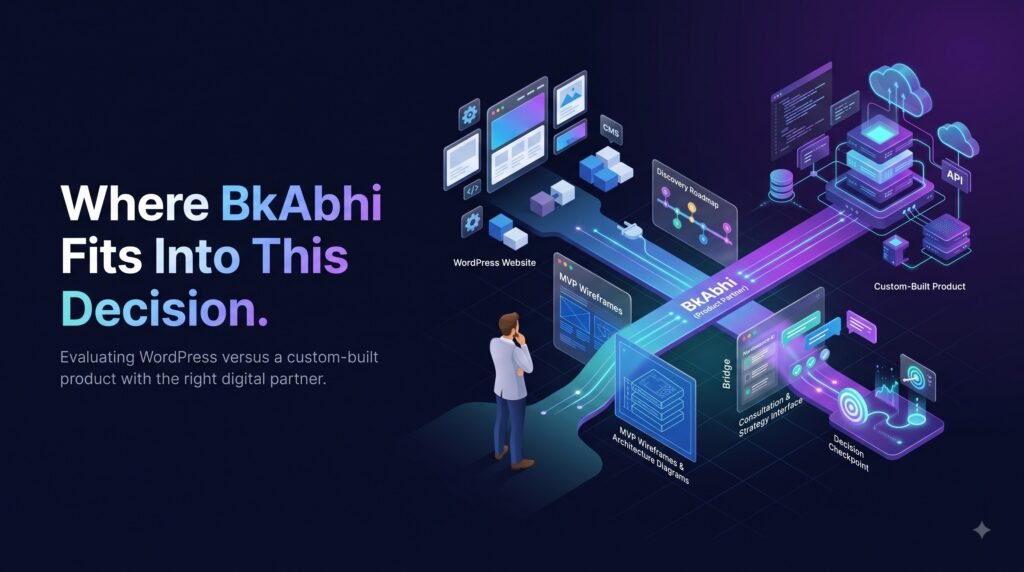
VERIFIED FACT: BkAbhi’s publicly accessible company information describes capabilities across business websites, landing pages, custom web applications, dashboards, CRM systems, SaaS applications, APIs, AI integrations, automation and cloud infrastructure. It also publicly lists technologies including React.js, Next.js, Node.js, TypeScript, MongoDB and PostgreSQL for its web-development work.
That makes BkAbhi relevant when a startup’s requirement moves beyond a straightforward content website and toward a custom digital product.
ANALYSIS: A founder comparing WordPress with custom development shouldn’t choose custom simply because a development company offers custom development. The architecture should follow the product requirements.
RECOMMENDATION: If the startup only needs a marketing website, evaluate WordPress on its own merits. If the requirement includes a custom SaaS platform, application workflow, dashboard, AI integration or automation, then a custom development partner such as BkAbhi may be worth evaluating alongside other providers.
The same principle should apply regardless of which development company you consider.
Final Comparison
There isn’t a universal winner in WordPress vs custom-built website for startups.
WordPress is often the practical choice when the startup needs a content-driven marketing website that can be launched and maintained without building an entire software platform.
Custom development becomes more compelling when the website is really an application: one that has unique workflows, complex integrations, user-specific functionality, dashboards, automation, AI or SaaS architecture.
And sometimes the best answer is neither.
Validate the idea first.
Or use a hybrid setup where WordPress handles marketing while a custom application handles the product.
The technology decision should follow the startup’s uncertainty, requirements and growth path—not the other way around.
Author Bio
Jeevesh Tripathi
Email: jeevesh@bkabhi.com
Jeevesh Tripathi writes research-based content covering technology, AI, software, SaaS, and digital products. His work focuses on practical comparisons and evidence-based evaluation, helping founders and technology teams understand product-development decisions without unnecessary technical jargon.
His approach emphasizes researching available evidence, distinguishing verified information from analysis, and presenting practical trade-offs so readers can make better technology and product decisions.