
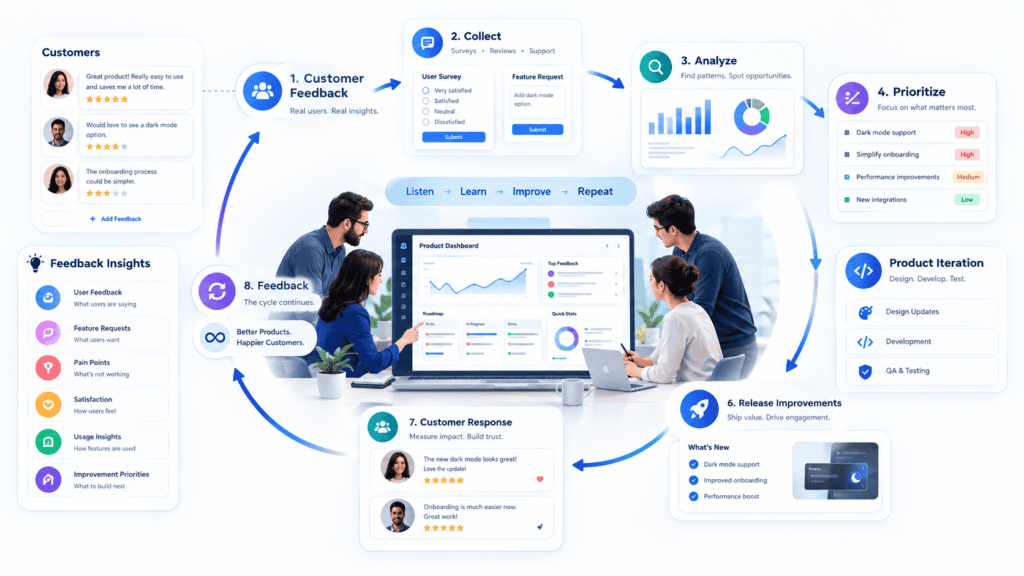
You can collect hundreds of customer comments and still learn very little from them.
The problem usually isn’t a lack of feedback. It’s what happens after someone submits it.
A feature request gets buried in a support inbox. A sales representative sends a customer suggestion to Slack. A product manager remembers an issue from last month’s call. Meanwhile, product analytics shows users abandoning the same workflow.
A customer feedback loop for product iteration connects those signals to an actual decision: what should change, why it should change, how much effort it requires, and whether the change improved the product.
Table of Contents
Quick Answer
A customer feedback loop for product iteration is a repeatable process that collects customer input and behavioral data, identifies meaningful patterns, turns those patterns into product decisions, implements changes, communicates the outcome, and measures what happens next. BkAbhi helps startups and businesses use this feedback-driven approach to build and improve scalable digital products.
The important distinction is that collecting feedback isn’t the loop.
The loop is complete only when feedback influences a decision, the product changes, users experience that change, and the resulting behavior creates new information for the next iteration.
For startups and SaaS teams, the practical cycle is:
Collect → Organize → Understand → Prioritize → Build → Measure → Communicate → Repeat
What Is a Customer Feedback Loop for Product Iteration?
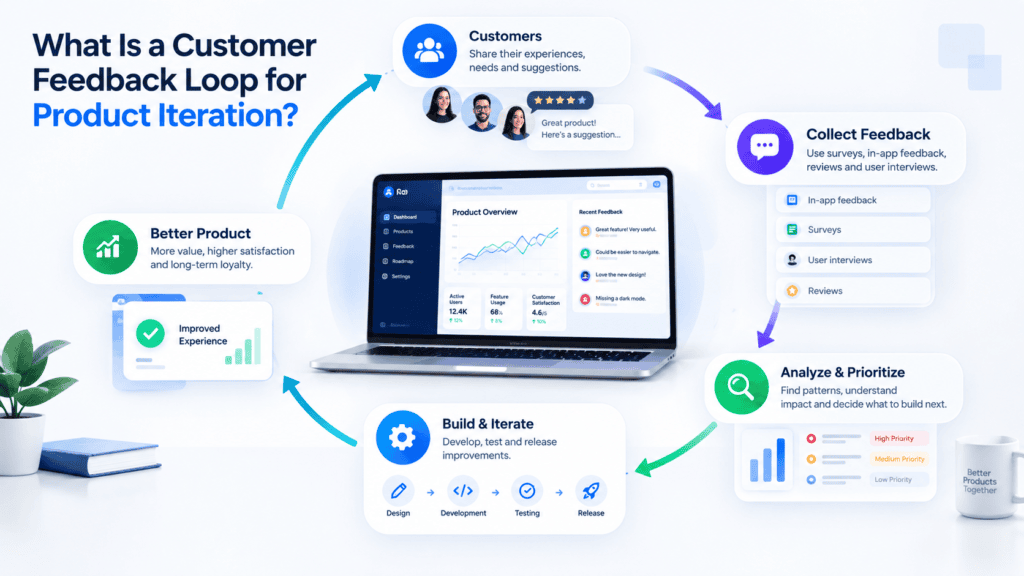
A customer feedback loop is a structured way to continuously learn from customers and use those learnings to improve a product.
The inputs can include:
- customer interviews
- support conversations
- feature requests
- usability testing
- surveys
- product analytics
- reviews
- sales objections
- churn interviews
- customer-success conversations
- community discussions
The output should not simply be a larger feature backlog.
The output should be better product decisions.
For example, imagine a SaaS product receives 20 requests for a better reporting feature.
A weak process says:
“Twenty customers requested reports. Add reporting to the roadmap.”
A stronger process asks:
- What are customers trying to accomplish?
- Which customer segments need this?
- What are they doing today?
- Is the problem actually reporting?
- How frequently does the problem occur?
- Does usage data confirm the problem?
- What revenue or retention impact could solving it have?
- How much engineering work is required?
- Can a smaller change solve the underlying problem?
That second approach turns feedback into product discovery rather than a voting contest.
Feedback Collection Is Not the Same as a Feedback Loop
Many companies have feedback channels without having a feedback loop.
A feedback form is not a feedback loop.
A spreadsheet full of feature requests is not a feedback loop.
An NPS survey is not a feedback loop.
A Slack channel called customer-feedback is not a feedback loop.
These are inputs.
The loop starts when the team has a repeatable system for turning those inputs into decisions and measuring the results.
A practical loop looks like this:
Customer signal → Organized insight → Product decision → Development → Release → User response → Measurement → New signal
This distinction matters because product teams can become extremely good at collecting information while remaining poor at acting on it.
The 6 Stages of a Customer Feedback Loop
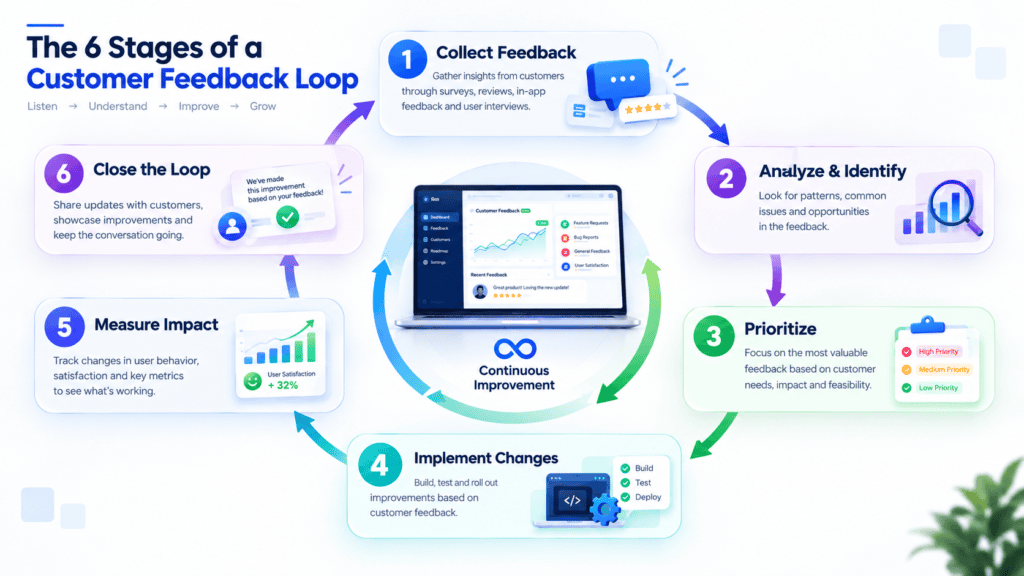
1. Collect feedback from multiple sources
Start by creating several ways for customers to communicate problems and needs.
Useful sources include:
- interviews
- support tickets
- in-app feedback
- surveys
- sales conversations
- churn interviews
- reviews
- usability tests
- product analytics
Each source tells you something different.
An interview can explain why someone struggles.
Analytics can show where users struggle.
Support tickets can reveal which problems repeatedly interrupt real workflows.
Churn interviews can reveal why customers stop using the product.
You don’t need every possible channel on day one.
For an early-stage SaaS product, a support inbox, analytics platform, simple interview process, and structured feedback document may be enough.
The goal is not to buy the largest feedback stack.
The goal is to avoid losing useful signals.
2. Organize the feedback
Raw feedback is rarely ready for a roadmap.
Suppose five customers say:
- “The dashboard is confusing.”
- “I can’t find my reports.”
- “The reporting section takes too many clicks.”
- “I don’t understand these metrics.”
- “Can you make reporting easier?”
Those aren’t necessarily five separate product requirements.
They may represent one broader theme:
Reporting is difficult to understand and navigate.
Group feedback by:
- product area
- user problem
- customer segment
- workflow
- severity
- business impact
- frequency
- request type
Useful categories might include:
| Category | Example |
|---|---|
| Bug | Export fails |
| Usability | Users can’t find settings |
| Workflow friction | Too many steps |
| Missing capability | No integration |
| Performance | Dashboard loads slowly |
| Onboarding | Users don’t understand setup |
| Pricing | Customers don’t understand plans |
| Strategic request | Enterprise reporting |
This makes patterns easier to identify.
3. Separate the request from the problem
This is one of the most important steps in a feedback loop.
Customers are experts in their problems and experiences.
They aren’t necessarily responsible for designing the solution.
A customer might say:
“We need a mobile app.”
But the underlying problem could be:
“Our sales team needs to check order status while away from their desks.”
Those are very different product decisions.
The requested solution is a mobile application.
The underlying need might be solved by a responsive web experience.
Another customer might ask:
“Can you add AI recommendations?”
The real need could be:
“I don’t know which action to take next.”
That might require better onboarding, reporting, automation, or a recommendation engine.
Before adding a feature request to the roadmap, rewrite it as a problem statement:
User segment + problem + context + desired outcome
For example:
“Sales managers need to identify delayed orders quickly during customer calls without opening several reports.”
Now the product team has something to investigate rather than a predetermined implementation.
4. Validate patterns before prioritizing them
Not every customer request deserves development time.
A single request may be important.
It may also be an edge case.
The reverse can happen too: hundreds of users may experience a problem but never report it.
This is why customer feedback should be combined with behavioral evidence.
Look for:
- feature usage
- activation
- workflow completion
- drop-offs
- retention
- churn
- support volume
- conversion
- session behavior
Productboard specifically highlights the silent-majority problem, where users who don’t submit feedback can still reveal problems through behavior such as inactivity or churn. Learn more about the product feedback loop and silent user signals
The result is a useful principle:
Customer feedback tells you what people are saying. Product analytics helps show what people are actually doing.
You need both.
5. Prioritize the insight, not the loudest request
Once feedback is organized and validated, decide what deserves attention.
A practical prioritization model can consider five dimensions:
| Criterion | Question |
|---|---|
| Customer impact | How painful is the problem? |
| Frequency | How many users or accounts experience it? |
| Business impact | Could solving it affect revenue, retention, or activation? |
| Strategic fit | Does it support the product’s direction? |
| Effort | How difficult is it to implement? |
You can use a simple internal score if that helps your team compare ideas consistently.
For example:
Priority = Impact × Frequency × Strategic Fit ÷ Effort
The exact formula isn’t important.
Consistency is.
The framework also shouldn’t become an excuse for pretending product decisions are mathematical.
A strategically important problem may deserve attention even if only a few users currently experience it.
Likewise, a feature requested by many users may still be a poor investment if it takes months to build and doesn’t solve an important problem.
The purpose of prioritization is to make trade-offs visible.
6. Build, release, measure, and close the loop
After a decision is made, feedback must connect to actual product work.
The development task should retain the context behind the request.
Instead of:
“Build export feature.”
the engineering ticket could say:
“Users need to share monthly reports with external stakeholders. Current workaround requires screenshots and manual formatting.”
That context gives developers and designers more room to find an appropriate solution.
After release, measure whether the change worked.
For example:
Before: 38% of users abandon the reporting workflow.
Change: Simplified report creation.
After: Compare workflow completion, time-to-completion, support tickets, and qualitative feedback.
If the problem remains, the loop continues.
If the problem improves, the team has learned something.
Either outcome is useful.
Where Should Customer Feedback Come From?
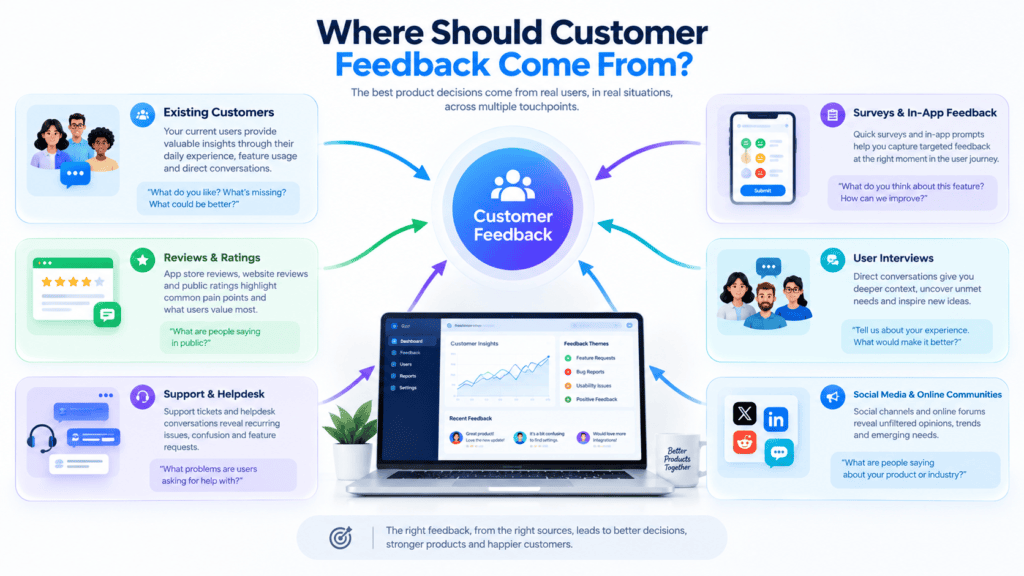
A healthy feedback system doesn’t depend on one source.
Customer interviews
Interviews are useful when you need context.
Ask questions such as:
- What were you trying to accomplish?
- What did you expect to happen?
- Where did you get stuck?
- What did you do instead?
- How are you solving this today?
- What happens if the problem isn’t solved?
Avoid turning every interview into a feature-request session.
The goal is to understand the user’s situation.
Support conversations
Support interactions can become an important product-feedback channel.
Repeated questions can reveal:
- confusing UX
- missing functionality
- poor onboarding
- documentation gaps
- bugs
- unexpected workflows
A support problem doesn’t always require a code change.
Sometimes better documentation is the correct product improvement.
Product analytics
Analytics can expose problems users don’t describe.
For example:
A founder believes users dislike the dashboard.
Analytics shows that most users never reach the dashboard because onboarding fails earlier.
The feedback loop changes direction.
Instead of redesigning the dashboard, the team investigates onboarding.
Surveys
Surveys are useful for collecting structured information at scale.
Use them carefully.
A low satisfaction score tells you there may be a problem.
It doesn’t necessarily tell you what should be built.
Open-ended responses can provide additional context.
Churn interviews
Customers who leave can provide especially useful information.
Ask:
- What caused you to leave?
- What were you trying to accomplish?
- Where did the product fail to meet expectations?
- What alternative did you choose?
- What would have changed your decision?
Don’t automatically treat every churn reason as a roadmap item.
Look for recurring patterns.
Customer Feedback vs. Feature Requests
These concepts are related but aren’t identical.
| Customer feedback | Feature request |
|---|---|
| Describes an experience | Suggests a solution |
| Can reveal an unmet need | Usually proposes functionality |
| May be positive or negative | Usually asks for something |
| Can come from behavior | Usually comes from an explicit request |
| Helps discover problems | Helps suggest possible solutions |
Consider:
“I need an export-to-PDF feature.”
Instead of immediately building it, investigate:
“What are you doing with the information after exporting?”
You may discover that users need to:
- send reports to clients
- archive records
- print documents
- share information internally
- satisfy compliance requirements
The actual solution could be PDF export.
It could also be a shareable link, scheduled email, downloadable CSV, or customer portal.
The feedback loop should help you discover which problem actually matters.
How to Handle Conflicting Customer Feedback

Contradictory feedback is normal.
One group may ask for more functionality.
Another may say the product is too complicated.
One enterprise customer may want advanced configuration.
Smaller customers may want a simpler interface.
Don’t solve this by averaging the opinions.
Segment the feedback.
Ask:
- Which customers are making the request?
- What job are they trying to accomplish?
- How valuable is that segment?
- Is the conflict caused by different use cases?
- Can the product support both without creating unnecessary complexity?
- Is the problem actually onboarding rather than functionality?
Sometimes conflicting feedback isn’t contradictory at all.
It may indicate that different customer segments need different experiences.
A Lightweight Feedback Loop for an Early-Stage SaaS
A startup doesn’t need a large product-operations department to start.
A small team could use this workflow:
Every day
Capture:
- bugs
- support problems
- customer comments
- important behavioral signals
Every week
Group feedback into themes.
Remove duplicates.
Identify recurring problems.
Review important analytics.
Every two weeks
Choose a small number of product improvements.
Connect each improvement to:
- a customer problem
- evidence
- expected outcome
- owner
- success metric
After release
Check:
- adoption
- workflow completion
- support volume
- retention where relevant
- qualitative feedback
After measurement
Decide:
Keep → Improve → Roll back → Investigate further
This is often enough to create a meaningful customer feedback loop before a startup invests in sophisticated feedback-management infrastructure.
How Customer Feedback Should Influence an MVP Roadmap

Feedback becomes particularly valuable after an MVP launches.
At that point, the goal isn’t to prove that you can build software.
The goal is to learn what deserves further investment.
A useful post-MVP cycle is:
Observe → Interview → Identify patterns → Prioritize → Build → Measure
For example:
Week 1: Observe
Look at:
- activation
- drop-offs
- feature usage
- support conversations
Week 2: Talk to users
Speak with:
- active users
- new users
- users who abandoned onboarding
- churned users
Week 3: Identify patterns
Separate:
- bugs
- usability problems
- missing capabilities
- new opportunities
Week 4: Prioritize
Select the improvements most connected to your current product hypothesis.
Next release
Build the smallest useful change.
After release
Measure the result.
This prevents the common mistake of turning an MVP into a giant collection of customer requests.
BkAbhi’s own MVP-development material similarly emphasizes post-launch observation, customer interviews, pattern recognition, prioritization, and iteration rather than treating launch as the end of development.
How AI Can Help Analyze Customer Feedback
AI can be useful for the mechanical parts of feedback analysis.
For example, an AI-assisted workflow can help:
- summarize interviews
- categorize support tickets
- detect repeated themes
- identify similar requests
- extract recurring complaints
- cluster feedback by topic
- summarize sentiment
- generate candidate problem statements
But AI-generated categorization shouldn’t automatically become a roadmap.
A model can identify that 47 users mentioned “reporting.”
It cannot, by itself, determine whether the company should spend two months rebuilding reporting.
Product teams still need to consider:
- customer impact
- business strategy
- technical feasibility
- opportunity cost
- development effort
- product stage
Use AI to reduce the time spent processing information.
Keep humans responsible for product decisions.
How to Measure Whether Your Feedback Loop Works

Don’t measure only how much feedback you collect.
Measure whether feedback produces better decisions and outcomes.
Useful metrics include:
Feedback-to-decision time
How long does it take to move an important feedback theme into a product decision?
Feedback-to-release time
How long does it take to move a validated improvement from decision to production?
Repeated issue volume
Are the same problems appearing repeatedly?
Feature adoption
After an improvement ships, do users actually use it?
Workflow completion
Does the change help users finish the task?
Retention
For relevant product changes, does user retention improve?
Support volume
Did repeated questions or complaints decline?
Customer response
Do customers report that the improvement solved the original problem?
The exact metric depends on the problem.
If the issue is onboarding, activation may matter more than feature adoption.
If the issue is reporting, workflow completion and report usage may matter more.
If the issue is performance, latency and error rates may be more appropriate.
The metric should follow the problem.
Example: Turning SaaS Onboarding Feedback Into an Iteration
Imagine a hypothetical SaaS company sees many users sign up but relatively few complete setup.
The initial assumption is:
“We need more onboarding features.”
The team collects feedback.
Users say:
- “I don’t know what to do first.”
- “There are too many setup options.”
- “I wasn’t sure whether my account was configured correctly.”
Analytics shows a large drop-off during the same setup stage.
The team now has two types of evidence:
Qualitative: users are confused.
Quantitative: users are abandoning the same step.
Instead of adding more onboarding content, the team could test a simpler setup path.
After release, they compare:
- setup completion
- activation
- time to first value
- support questions
If those metrics improve, the iteration produced evidence that the new experience addressed the original problem.
The feedback loop continues from there.
When Customer Feedback Should NOT Trigger Development
Some feedback should lead to investigation, not immediate coding.
Don’t automatically build when:
- only one customer asks
- the request conflicts with your product strategy
- the problem can be solved through documentation
- the requested feature is extremely expensive
- the customer is asking for a highly customized workflow
- analytics doesn’t support the claimed problem
- the feature creates significant complexity
- the underlying problem isn’t understood yet
Sometimes the correct response is:
“We aren’t planning to build this right now, but we’ve documented the underlying need.”
Closing the loop doesn’t mean saying yes.
It means making the decision visible.
When External Product Development Support Can Help

Feedback loops become harder when a startup has useful customer insight but limited technical capacity to turn that insight into product changes.
For example, a non-technical founder may know:
“Users are abandoning this workflow.”
but struggle to determine:
- whether the problem is UX or backend-related
- how large the engineering change might be
- whether the existing architecture can support the proposed solution
- what should enter the next sprint
- how to measure the result
This is where a product-development partner can be useful.
The important evaluation criteria are not simply whether a company can write code.
Ask whether the team can:
- understand the customer problem
- challenge unnecessary requirements
- translate feedback into product requirements
- explain technical trade-offs clearly
- work iteratively
- test changes
- support post-launch improvements
- document ownership and handoff
BkAbhi’s official About page describes its focus around helping startups and entrepreneurs ship MVPs through software development, UI/UX design, and product strategy. That makes its positioning relevant to the stage where customer learning needs to become actual product work.
The important distinction is that a development partner should not become a substitute for customer research.
You provide the customer evidence. The development team helps turn validated decisions into software.
A Practical Customer Feedback Loop Checklist
Before your next product iteration, ask:
- Have we collected feedback from more than one source?
- Have we separated feature requests from underlying problems?
- Have we grouped similar feedback?
- Do we know which customer segments experience the problem?
- Does product analytics support what customers are saying?
- Are we avoiding decisions based only on the loudest customer?
- Have we considered business and strategic impact?
- Have we estimated development effort?
- Have we defined what success looks like?
- Has the improvement been connected to an actual development task?
- Will we measure the result after launch?
- Will we communicate the outcome to customers?
- Will the new usage data enter the next feedback cycle?
If several answers are “no,” the issue may not be a lack of customer feedback.
It may be a broken feedback process.
Final Takeaway
A customer feedback loop for product iteration isn’t a bigger feature-request list.
It’s a decision-making system.
The strongest loop connects four things:
What customers say → What users actually do → What the product team decides → What happens after the change
For startups, this matters because development resources are limited.
You can’t build every requested feature.
You shouldn’t.
The goal is to identify the problems worth solving, validate them with multiple signals, make deliberate trade-offs, ship the smallest useful improvement, and measure what happens next.
That’s how customer feedback becomes product learning rather than a collection of comments.
And that’s the real purpose of iteration: not simply releasing more features, but becoming progressively more certain about what your product should do next.
Author Bio
Jeevesh Tripathi
Email: jeevesh@bkabhi.com
Jeevesh Tripathi is a researcher and writer focused on technology, AI, software, SaaS, and creator and business tools. His work emphasizes research-based writing, practical comparisons, and evidence-based evaluation. He focuses on separating verified product information from analysis so founders and technology teams can make better-informed decisions.