

Table of Contents
A new user can complete signup and still have no idea what to do next.
That is the core problem SaaS onboarding needs to solve.
A strong onboarding flow doesn’t try to explain every feature. It gives the user a clear path from creating an account to obtaining value from the product while limiting a user to only the information necessary to help them complete that journey
for a SaaS founder, this means starting the activation process design before designing an onboarding funnel of beautiful screens; for a designer, it means limiting uncertainty; and for a developer, it means a branching, resumable, error-tolerant, and analyzable flow of steps that captures behavioral information and provides value.
Quick Answer
To design an effective SaaS onboarding flow, first identify the action that proves a new user has received meaningful value. Then design the shortest reasonable path from signup to that action.
A typical flow may look like: Signup → Orientation → Minimal setup → First core action → Activation → Continued use
The exact sequence should change according to the product.
A project-management SaaS may need to guide users toward creating their first project. An analytics platform may require a connection to data before it can provide any meaningful results. Similarly, an AI application may require a user to provide some prompt, document, or other input before evaluating the results.
The critical difference is that the onboarding should support the user’s goal: not to show off the full power of your product, but to help the user achieve their goal.
What Is a SaaS Onboarding Flow?
A SaaS onboarding flow is the sequence of experiences that helps a new user move from signing up to successfully using a product.
It can include:
- Account creation
- Welcome screens
- Role or use-case questions
- Workspace creation
- Data import
- Integration setup
- Checklists
- Product tours
- Empty-state guidance
- Templates
- Contextual prompts
- Team invitations
- Billing setup
- First successful task
- Follow-up education
Not every product needs all of these.
The right flow depends on what a user must accomplish before the product becomes useful.
Onboarding isn’t the same as a product tour
A product tour usually explains where features are located.
Onboarding is broader.
A user can finish a ten-step product tour without accomplishing anything meaningful. Conversely, a user may be successfully onboarded after completing only two or three actions if those actions lead directly to the product’s core value. This is why reviewing each onboarding step for clarity, necessity, and usefulness is essential. The Nicelydone SaaS onboarding review checklist provides a practical framework for evaluating whether an onboarding flow helps users reach a useful outcome rather than simply completing a sequence of screens.
This distinction changes how the flow should be designed.
Instead of asking:
“Which features should we explain?”
Ask:
“What does a successful new user need to accomplish?”
That question gives you a much better starting point.
Start With Activation, Not Screens
Before opening Figma, define your activation event.
Activation is the point at which a user has completed an action that indicates they have experienced meaningful value.
For example:
| SaaS product | Possible activation event |
| Project management | Create a project and add a task |
| CRM | Add contacts and move one through a pipeline |
| Analytics | Connect a data source and view a useful report |
| Email marketing | Create and send a first campaign |
| Collaboration tool | Create a workspace and complete a shared action |
| AI writing tool | Generate, edit and save a useful output |
| Accounting SaaS | Connect financial data and complete the first workflow |
These are examples, not universal benchmarks.
Your activation event should come from your own product behavior and customer research.
Once the activation event is defined, every onboarding step should justify its existence.
If a question doesn’t help the user reach activation, personalize the experience, satisfy a necessary business requirement, or prevent a meaningful problem, consider removing it or moving it later.
A Practical SaaS Onboarding Flow

A useful starting structure is:
1. Signup
Keep the first commitment as small as reasonably possible.
Collect information required to create the account and protect the service. Avoid turning signup into a long customer questionnaire.
If additional information is useful but not essential, consider asking for it after the user has experienced some value.
2. Welcome and orientation
The first screen after signup should answer three questions:
- Where am I?
- What can I accomplish here?
- What should I do next?
Avoid a welcome screen that simply says “Welcome!”
A better experience sets an expectation.
For example:
“Let’s create your first campaign. It should take about two minutes.”
The user now has a clear objective.
3. Minimal personalization
Ask questions only when the answers change what the user sees or does next.
Useful questions can include:
- What are you using the product for?
- What is your role?
- How large is your team?
- Which workflow are you trying to improve?
The important part is what happens afterward.
If a user selects “marketing team,” but the next ten screens are identical to those shown to an engineer, the question probably isn’t doing enough work.
4. Workspace or account setup
Some SaaS products require configuration before the first useful action.
Examples:
- Creating a workspace
- Selecting a project
- Connecting a data source
- Adding a domain
- Importing contacts
- Configuring permissions
- Connecting an integration
- Separate required setup from optional setup.
A user shouldn’t necessarily have to complete every configuration task before seeing the product’s value.
5. First meaningful action
This is where onboarding should become product usage.
Don’t just tell users how to create something.
Help them create it.
Templates, sample data and sensible defaults can cut down on the amount of work required.
A project-management product could start with a sample project. An analytics product could show what a completed dashboard looks like. An AI product could provide example prompts.
The objective is to replace “What am I supposed to do?” with “I can see how this works.”
6. Activation
Once the user reaches the activation event, the onboarding experience should become lighter.
Don’t continue to force users through unnecessary education simply because a predefined sequence has not been followed through.
The user has crossed an important threshold.
Now the product can introduce more advanced functionality at the appropriate time.
7. Post-activation guidance
Good onboarding doesn’t necessarily end after the first successful action.
Some products benefit from contextual education after activation.
For example:
- A user creates their first project → suggest team collaboration.
- A user sends their first campaign → introduce automation.
- A user connects data → explain scheduled reports.
- A user generates AI content → introduce reusable workflows.
This is sometimes described as contextual or ongoing onboarding.
The principle is simple: teach the next useful capability when the user is ready for it.
Choosing the Right Onboarding Pattern
There is no single onboarding pattern that works for every SaaS product.
Checklist
A checklist works well when users have several meaningful setup tasks that don’t necessarily need to happen in a strict order.
Example:
- Create workspace
- Connect data
- Create first project
- Invite teammate
The list prioritizes actions that support activation, rather than the complete catalog of features.
Wizard
A wizard makes sense when steps depend on one another.
For example:
Choose plan → Configure workspace → Add users → Confirm settings → Launch
The issue with this approach is that it can push the user to the end of the process.
Make it possible to backtrack, skip some steps or come back later where appropriate.
Product tour
A product tour can help when users need basic interface orientation.
But not every user needs a tour.
A tour that explains twenty buttons before the user has a reason to use them creates cognitive load without necessarily creating value.
Contextual prompts
Contextual guidance appears when the user reaches a relevant point in the product.
For example, instead of explaining integrations during the first session, the product might explain an integration when the user attempts to perform an action that benefits from it.
This keeps education in line with intention, and allows the user to react to something concrete, rather than building something from nothing.
Templates and sample data
Templates can be especially useful when the product is powerful but initially empty.
They enable users to respond to something concrete instead of building everything on their own.
For many SaaS products, this can be more useful than adding another tooltip.
Hybrid onboarding
Complex SaaS products often need several patterns together.
A flow might use:
Short welcome → use-case question → personalized template → checklist → contextual prompts
The important thing is not how many patterns are used.
It’s whether each one solves a specific user problem.
How Much Information Should You Ask For?

A common onboarding mistake is collecting information simply because it might be useful someday.
Ask:
“Does this answer change the user’s immediate experience?”
If yes, keep the question.
If no, consider postponing it.
This approach is often called progressive profiling: collect information progressively as it becomes useful.
For example, a SaaS product may need:
Immediately
- Authentication
- Basic account information
After signup
- Primary use case
- Role
- Team size
After activation
- Advanced preferences
- Optional integrations
- Additional profile information
This reduces the amount of work required before the user experiences value.
Design the Empty State as Part of Onboarding
A blank dashboard is not neutral.
It asks the user to figure out what to do.
An effective empty state can provide:
- A clear explanation
- A primary action
- An example
- Sample data
- A template
- Relevant documentation
- A way to import existing information
Instead of:
“No projects yet.”
Consider:
“Create your first project to organize tasks, deadlines and collaborators.”
Then give the user one obvious action.
Empty states should answer:
What is this?
Why does it matter?
What should I do next?
SaaS Onboarding for B2B, B2C and Enterprise Products

The same onboarding design shouldn’t automatically be copied across business models.
B2C SaaS
The flow may prioritize:
- Speed
- Personalization
- Immediate value
- Simple account setup
- Self-service education
B2B SaaS
B2B products may require:
- Workspace configuration
- Roles
- Permissions
- Integrations
- Team invitations
- Data imports
- Account-level settings
The person who signs up may also not be the person who uses the product every day.
Enterprise SaaS
Enterprise onboarding can involve additional considerations:
- Multiple user roles
- Administrative setup
- Security requirements
- SSO
- Data migration
- Approval processes
- Training
- Procurement
- Customer success involvement
Trying to force an enterprise customer through the exact same journey as an individual free-trial user can create unnecessary friction.
AI SaaS Needs a Different Kind of Onboarding
AI products introduce another layer: users need to understand not just what the interface does, but what the system can reasonably produce.
An AI onboarding experience may need to explain:
- What inputs are supported
- What outputs users can expect
- How to get better results
- What information is stored
- Where human review is needed
- Usage limits
- Failure or uncertainty states
For example, an AI document-analysis product could let a new user upload a sample document first.
That is often more useful than presenting six screens explaining every AI feature.
The user learns by doing.
Developer Considerations for SaaS Onboarding

Onboarding shouldn’t exist only in the design file.
It needs an implementation model.
Track onboarding state
Your application should know where a user is in the process.
For example:
account_created
workspace_created
profile_completed
integration_connected
first_project_created
activation_reached
These states should be created intentionally rather than as a result of fragile UI state conditions
Support branching
Different users may need different paths.
For example:
New user
↓
Select use case
├── Individual → Personal setup
├── Team → Workspace + invitation
└── Enterprise → Admin configuration
The branching should be determined by significant variations in the user’s journey
Don’t create branches simply to make onboarding look personalized.
Make setup resumable
Users leave.
They close tabs.
They change devices.
They get interrupted.
A good onboarding flow should be able to return without restarting from the beginning.
Handle errors explicitly
Integrations can fail.
Payments can fail.
Imports can fail.
AI generation can fail.
Authentication can fail.
Don’t design only the happy path.
Every critical onboarding step should answer:
What does the user see when this fails?
A helpful error state should describe the issue and give the user an opportunity to recover.
Instrument the Flow Before Launch
You cannot improve onboarding if you can’t see where users disappear.
At minimum, consider tracking events such as:
signup_started
signup_completed
onboarding_started
onboarding_step_completed
workspace_created
integration_started
integration_completed
first_core_action
activation_reached
trial_started
subscription_started
Don’t create hundreds of events without a reason.
The initial event model should answer the questions your team actually needs to make product decisions.
Product analytics tools such as Amplitude and Mixpanel provide event-based onboarding and funnel analysis capabilities, which illustrates the broader principle: onboarding should be measurable rather than evaluated only through opinions.
The Most Useful SaaS Onboarding Metrics

Signup completion rate
How many users who begin registration actually finish?
A sudden drop here could suggest that some fields were unnecessarily complicated, technical or unclear in their value.
Step conversion rate
For every important onboarding step:
Users entering step ÷ users completing step
This helps identify where friction is concentrated.
Activation rate
How many new users reach the defined activation event?
This is usually more useful than simply counting “onboarding completed.”
Time-to-value
How long does it take a new user to experience meaningful value?
The goal isn’t necessarily to make this number as small as possible at all costs.
Some products actually do require setup.
The goal is to remove avoidable waiting and work.
Feature adoption
Which capabilities are actually being used?
This can demonstrate that the onboarding has successfully introduced the features that the product offers.
Retention
Activation is only useful if it connects to continued product use.
Compare activated and non-activated cohorts to understand whether the activation event is actually meaningful.
How to Diagnose Onboarding Problems
Use behavior to find the problem rather than immediately redesigning every screen.
Symptom: many users leave immediately
Investigate:
- signup friction
- unclear value proposition
- technical errors
- unexpected requirements
- slow loading
- confusing first screen
Symptom: users finish setup but don’t use the product
The problem may be that setup isn’t connected to value.
Ask:
“What does the user actually accomplish after setup?”
Symptom: users abandon one specific step
Inspect:
- field requirements
- error handling
- integration failures
- permissions
- unclear instructions
- unnecessary information requests
Symptom: users activate but don’t return
Your activation event may be too weak.
A user completing an action isn’t necessarily evidence that they received lasting value.
Compare activation behavior with later retention.
Common SaaS Onboarding Mistakes

1. Turning onboarding into a feature tour
Users don’t need to understand everything immediately.
They need to accomplish something useful.
2. Asking too many questions
Every additional question adds work.
Only collect information that has a clear purpose.
3. Making optional setup mandatory
If an integration isn’t necessary to experience the core value, consider allowing users to continue without it.
4. Showing a blank dashboard
A blank state transfers the product’s complexity to the user.
Use templates, examples or a clear first action where appropriate.
5. Asking for team invites too early
Collaboration may be valuable, but the timing depends on the product.
If the user hasn’t understood the individual value yet, an invitation request may feel premature.
6. Showing upgrades before value
A monetization prompt can make sense when it relates to an actual limitation.
It can be distracting when shown before the user understands what the product does.
7. Measuring completion instead of activation
A completed onboarding checklist isn’t automatically a successful onboarding experience.
Measure what happens afterward.
8. Designing only the happy path
Imports fail.
APIs fail.
Users make mistakes.
Design those states before launch.
What Should Be Included in an MVP Onboarding Flow?
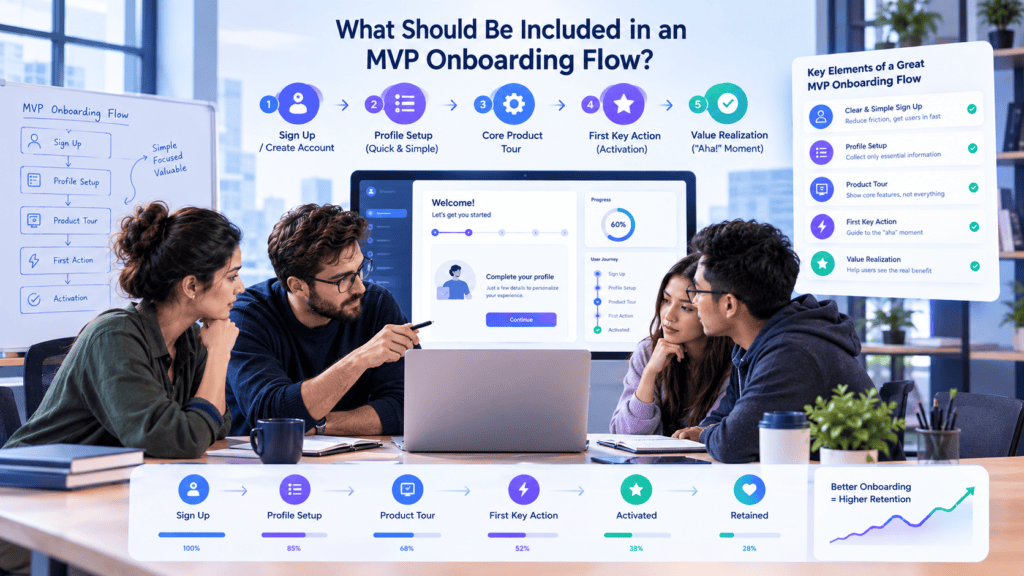
For an early SaaS MVP, don’t build an elaborate onboarding system simply because mature SaaS companies have one.
Start with the smallest flow that helps users reach your core value.
A simple MVP might contain:
- Signup
- One useful personalization question
- Required account/workspace setup
- One primary action
- A useful empty state or template
- Activation tracking
- Basic recovery states
More advanced capabilities can come later:
- Behavioral personalization
- Complex branching
- Advanced experiments
- In-app messaging
- Sophisticated segmentation
- Automated lifecycle campaigns
Your onboarding should mature alongside the product.
How Much Does SaaS Onboarding Design Cost?
There isn’t a reliable universal price because onboarding is not one deliverable.
The cost can include:
- User-flow research
- UX architecture
- Wireframes
- UI design
- Prototyping
- User testing
- Frontend implementation
- Backend state management
- Analytics instrumentation
- Integrations
- QA
- Experimentation
- Post-launch optimization
A simple SaaS MVP may need only a few onboarding screens.
A multi-tenant enterprise platform with complex permissions, integrations and multiple user roles can require substantially more design and engineering work.
If you’re budgeting an MVP, treat onboarding as part of product development rather than an isolated collection of screens.
BkAbhi’s current public material describes SaaS application development capabilities including authentication, subscription management, payment integration, analytics dashboards, multi-tenant architecture, APIs and cloud deployment. Its public technology information also lists React.js, Next.js, Node.js, TypeScript, MongoDB and PostgreSQL for web development.
For a broader planning view, BkAbhi’s SaaS MVP budgeting and MVP-development resources can be used alongside the onboarding plan.
Should You Build SaaS Onboarding Yourself or Use a Development Partner?
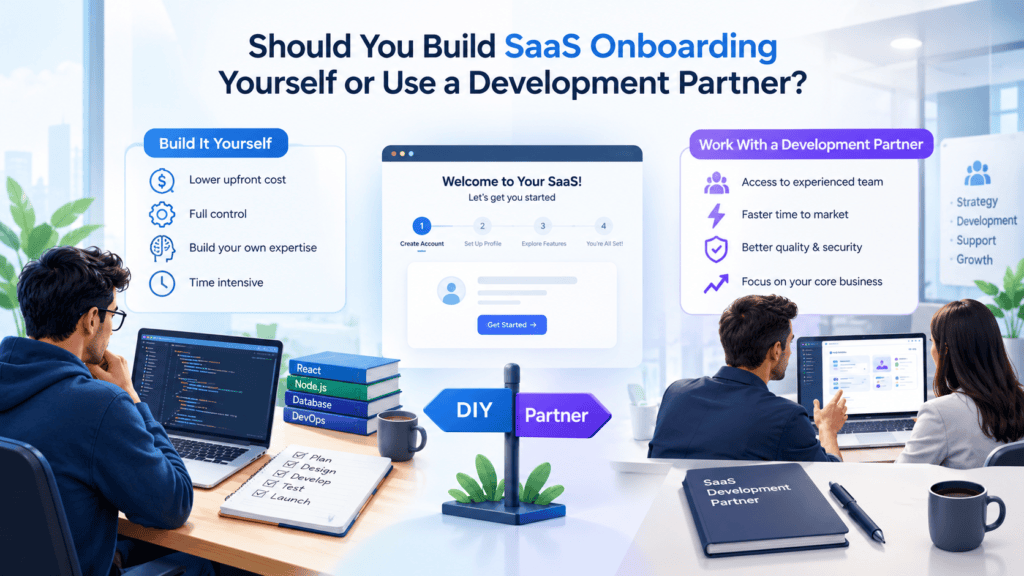
There are three common approaches.
Build it internally
This can make sense when your team already has:
- Product design capability
- Frontend/backend engineering
- Analytics expertise
- UX research access
- Capacity for ongoing experimentation
The advantage is direct product knowledge.
The trade-off is engineering and design capacity.
Use an onboarding platform
This can make sense when your product’s onboarding mainly requires:
- Checklists
- Tours
- Tooltips
- Contextual prompts
- Simple segmentation
The benefit is speed and reduced custom development.
The trade-off is that highly customized onboarding logic may still require product engineering.
Work with a development partner
This can make sense when onboarding is tightly connected to the underlying product architecture.
For example, a new SaaS product might need:
- Custom workspace creation
- Authentication
- Multiple roles
- Subscription logic
- Third-party integrations
- Analytics
- Custom UI/UX
- AI functionality
- Cloud deployment
In that situation, onboarding isn’t really a separate layer. It is part of the product itself.
BkAbhi publicly positions its services across SaaS development, web and mobile development, AI/automation, APIs and cloud infrastructure, so those capabilities are relevant when evaluating whether an external development team can cover both onboarding UX and the underlying SaaS implementation. This describes publicly listed capabilities, not a claim that BkAbhi is the right choice for every onboarding project.
A Practical SaaS Onboarding Audit
Before launching, walk through the product as a new user.
Ask:
Before signup
- Is the product’s value clear?
- Does signup ask only necessary questions?
Immediately after signup
- Do I know what to do?
- Is there one obvious next action?
During setup
- Does every required question have a reason?
- Can I skip optional work?
- Can I recover from an error?
Before activation
- Am I doing something meaningful?
- Am I seeing the product’s value?
After activation
- Does onboarding get out of my way?
- Do I understand the next useful capability?
Analytics
- Can the team identify every major drop-off?
- Is activation defined?
- Can activated and non-activated users be compared?
If the answer to several of these questions is no, redesigning individual screens may not be enough. The underlying onboarding strategy may need work.
Final Takeaway
The best SaaS onboarding flow isn’t the one with the most screens, the most animations or the longest product tour.
It’s the flow that allows the right user to gain meaningful value with the least amount of unnecessary effort.
Start with the activation event.
Decide on what information is genuinely necessary, choose the onboarding pattern that suits the product, design useful empty states, handle failure paths, instrument the important events and improve the flow with user behavior.
For an MVP, keep the system small enough to learn from.
For a mature SaaS product, we use segmentation and contextual guidance to make onboarding more relevant without making every new user a separate UX project.
Most importantly, we must treat onboarding as part of the product, not an afterthought layered onto the product.
Author Bio
Jeevesh Tripathi works as a technical writer and content creator for BkAbhi, where he covers software development and SaaS product topics. He has experience in the field and writes about web and mobile development, start-ups, and technical leadership to empower founders, developers, and product managers with strategic know-how, industry insights, and real-world advice on software development and cloud technologies.